

Get ready to join the action-packed combat in Call of Duty Warzone Mobile through this ultimate guide, which takes you through one of the most thrilling battle royale experiences on mobile. We covered everything essential from tips and strategies to advanced techniques necessary to dominate the battlefield. Are you prepared to lead your squad to victory and become the ultimate Warzone champion? Let’s dive deep into the intense world of Call of Duty Warzone Mobile!
Call of Duty Warzone Mobile is the mobile adaptation of the very popular battle royale game called Call of Duty Warzone.
This mobile version, developed by Activision, epitomizes all the thrilling moments of the original onto your smartphone or tablet.
Players drop into expansive maps, full of detail, where they will scavenge for weapons, gear, and resources while intense combat with other players is going on.
The title retains its high-octane graphics and seamless gameplay, this time fully optimized for mobile. With features such as custom load-outs, multiple game modes, social capabilities in-game voice chat, and friend lists-Warzone Mobile is bound to offer an engrossing and competitive experience.
This game is filled with endless hours of strategic and action-packed fun, whether playing solo or with friends across different platforms. Needless to say, this is a must-have for enthusiasts of the battle royale genre.
Features of Call of Duty Warzone Mobile
Some of the things that make Call of Duty Warzone Mobile stand out in the mobile gaming arena include the following. Here is an overview of what one would expect:
- Battle Royale Gameplay: Experience intense battle royale, the same as the original Warzone, where up to 150 players go at it in a fight to be the last man standing on expansive maps.
- Cross-Platform Play: Play and team up with friends across platforms; you’ll never have to worry whether they’re on a mobile device or a console.
- Iconic Maps: Verdansk, Rebirth Island, and other iconic maps are authentically reproduced for mobile, bringing the full Warzone experience right to your fingertips.
- Customizable Loadouts: Unlock hundreds of items for customizing your loadout, including your favorite armaments, perks, and equipment to create and customize your loadout-the way you like it.
- Realistic Graphics: The high-quality, mobile-optimized graphics allow for striking visuals and gameplay while keeping you in the heart of the action.
- Modes and Events: Engage in a set of game modes and seasonal events that keep gameplay fresh and exciting with new challenges and rewards.
- Social Features: In-game voice chat, friend lists, and clan systems are sure to help you coordinate with teammates, build a community, and improve your gaming experience.
- Progression System: Level up your character for access to new content via a deep progression system, including battle passes, challenges, and seasonal updates.
- Performance Optimization: It will run smoothly on a huge amount of different mobile hardware to make sure the best experience is achieved no matter what hardware you use.
Explore the Call of Duty Evolution – Comparing MW3 with Previous versions

How to Play Call of Duty Warzone Mobile
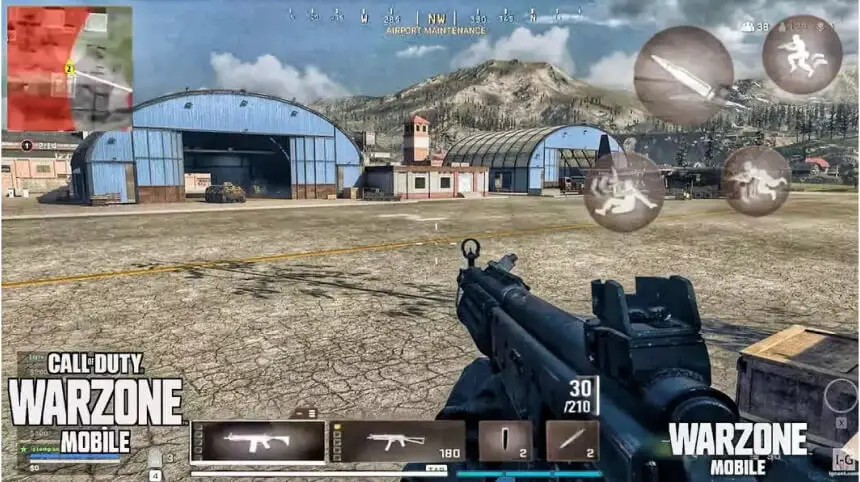
Playing Call of Duty Warzone Mobile is such a thrill. Here’s a step-by-step guide to help you get started and rise to the top of this game.
Download and Installation
- Download: The Call of Duty Warzone Mobile is available on the App Store for iOS users and on the Google Play Store for Android users.
- Installation: Follow the on-screen instructions to install the game on your device.
Creating/Signing in to Your Account
- Create Account: If you are a new user, then create your Activision account; if you are already a user, you can log in using your credentials.
- Link Accounts: You can link your account with other platforms for cross-platform play.
Mode Selection
- Battle Royale: Drop into huge maps of up to 120 players to emerge as the last person or team standing.
- Resurgence Mode: A quick-action mode with opportunities to redeploy after being eliminated.
Customize Your Loadout
- Select Weapons: Choose a variety of weapons, attachments, and perks.
- Equip Perks: Equip perks that enhance your abilities in battle.
- Save Loadouts: Make multiple loadouts for different playstyles.
Familiarize Yourself with the Controls
- Settings: Adjust sensitivity and layout to suit comfort.
- Practice: Take some time in practice mode, and get used to the controls.
Understand the Map
- Explore: Learn key locations, loot spots, and strategic points on the map.
- Safe Zone: Observe the circle that shrinks to avoid getting caught in gas.
In-Game Cash
- Intake Cash: Gather loot in buildings and finish contracts to attain cash.
- Buy Stations: Cash can be used at Buy Stations to purchase key items like loadout drops, UAVs, and self-revive kits.
Gear up for victory in Call of Duty Warzone Mobile—get your Call of Duty Gift Cards today and dominate the battlefield with exclusive in-game cash for epic upgrades, weapons, and more!
Fulfill Your Contracts
- Bounties: Eliminate certain players to get rewards.
- Recon: Capture points for intel on the next safe zone.
- Scavenger: Search for and open supply boxes; these contain really valuable loot.
Communicate with Your Team
- Voice Chat: In-game voice chat for near real-time communication.
- Ping System: Make use of the ping system to mark enemies, locations, and items.
Stay Alert and Adapt
- Awareness: Be constantly aware of your environment and listen for audio cues.
- Adapt: Be prepared to change your strategy according to the situation and enemy movements.
Master the Gulag
- 1v1 Combat: If eliminated early, you’ll have a chance to return to the game by winning a 1v1 fight in the Gulag.
- Focus: Use this opportunity to respawn and rejoin your team.
System Requirements for Optimal Performance
To play Call of Duty Warzone Mobile, your device needs to meet certain system requirements to ensure smooth gameplay. Here are the updated minimum specifications:
For Android Devices
- Operating System: Android 13 or higher
- RAM: 4GB or more
- GPU: Adreno 618 or better
- Storage: At least 4GB of free space for the game, with additional space for game data
For iOS Devices
- Operating System: iOS 17 or higher
- RAM: 3GB or more (excluding iPhone 8)
- Storage: At least 4GB of free space for the game, with additional space for game data
Strategies for Winning in Call of Duty Warzone Mobile

Here are the strategies for winning in Call of Duty Warzone Mobile listed in bullets with explanations:
- Choose Your Landing Spot Wisely: Go for less populous areas to safely loot and gear up. Look for places with several buildings and supply boxes.
- Prioritize Loadouts: Collect in-game cash to buy a loadout drop as early as possible. Use your loadout to get your preferred weapons, perks, and equipment.
- Master Movement: Constantly move to avoid being an easy target. Utilize sliding and jumping to make yourself harder to hit.
- Stay in the Safe Zone: Keep an eye on the shrinking safe zone and plan your movements accordingly. Stay towards the edge of the circle to avoid being surrounded.
- Use Headphones: Listen for footsteps, gunshots, and other sounds that may pinpoint where hostiles are. Use voice chat to communicate with your team about what is happening.
- Full Contracts: These yield great rewards in cash and even tips on where the next safe zone is. Switch it up between bounty, scavenger, and recon contracts to gain various benefits.
- Use Vehicles: Speed around the map and away from the closing circle using vehicles. They can also act as temporary cover during firefights.
- Choose Good Teamwork: Always be in your team’s company to ensure mutual support for each other and to revive fallen comrades. Assign roles directly like a sniper, a support, and a scout.
- Resource Management: Replenish your ammo and armor often. Purchase self-revive kits and use them to re-engage in combat when downed.
- Adapt and Improvise: Be prepared to adjust your strategy given the situation and movements of enemies. Go over your gameplay, learn from mistakes, and improve your game sense.
- Engage Wisely: The player should not engage in fights unnecessarily to avoid exposure of himself to other guys. Always try to join an ongoing fight between other teams.
Conclusion
Call of Duty Warzone Mobile condenses the battle royale experience of the main game into mobile form, with familiar maps, loadout customization, and cross-platform capability.
Some important strategies include choosing good landing spots, prioritizing load-outs, mastering movement, staying in the circle, using headphones for better awareness, completing contracts for rewards, and vehicles, good team collaboration and communication, resource management, adapting, and knowing when to engage in a gunfight.
By following these tips, gamers can maximize their chances of winning and enjoy a dynamic, immersive gaming experience on the go.
Explore and stay updated with all new Call of Duty updates and installments in Call of Duty News in ARPAY.

FAQs
Can I get Call of Duty Warzone on my phone?
Yes, it is Free To Play Scan to download on Google Play or the App Store.
Why was Warzone Mobile removed from the Play Store?
It means the game may not be available in your country. Call of Duty Warzone Mobile is currently only available in certain countries, including the United States, Canada, and the United Kingdom.
You may not have a compatible device. Call of Duty Warzone Mobile requires a device with at least 2GB of RAM and 3GB of storage space.
What devices are supported by Call of Duty Warzone Mobile?
devices are supported by Call of Duty: Warzone Mobile: devices on iOS 17 or higher or Android 13 or higher operating systems are compatible except for the following GPUs that do not support the mindless texturing requirement: Adreno (TM) 610. Adreno (TM) 612. Adreno (TM) 613.

Aya Atef
I'm Aya, a content creator at ARPay, crafting engaging articles about payment gift cards, digital installments, and everything that makes online shopping seamless. Whether it's gaming top-ups or the latest e-commerce trends, I write to level up your shopping experience!

