


With over 25 million monthly log-ins into Counter-Strike 2, Call of Duty still ranks in the best-selling franchises of games, and first-person shooting claims the highest number of gamer-played games within the same field. Ready to get started with FPS? It is part of our “Master Every Genre” series, following on from our previous guides on PC genres and RPG games. It’s time to take you from the new kid on the block to a confident player holding their own in any firefight.
What separates FPS games from the rest? The rush after securing a match-winning kill, satisfaction from perfect aim, and a feeling of accomplishment after coordinating and translating your winning strategy with teammates are all factors.
Whether you’re just about to enter your first FPS match or want to get better at it, this guide will show you everything you need to know.
Essential mechanics to optimal settings and proven strategies professionals use to destroy their opponents in matches. You will learn how to:
- Master fundamental aiming techniques
- Develop crucial movement skills
- Build game awareness
- Choose the best FPS games for your skill level
Don’t miss our Beginner Guide to PC Gaming – Your Starter Kit, Learn more about the PC and RPG games, and how to start as a beginner. Get started here!
Understanding FPS Game Basics
FPS games are about quick thinking, precision control, and strategic thinking. Since the details change with each new game, these base concepts are where you can learn to master and enjoy all of this game genre.
Shooting Mechanics
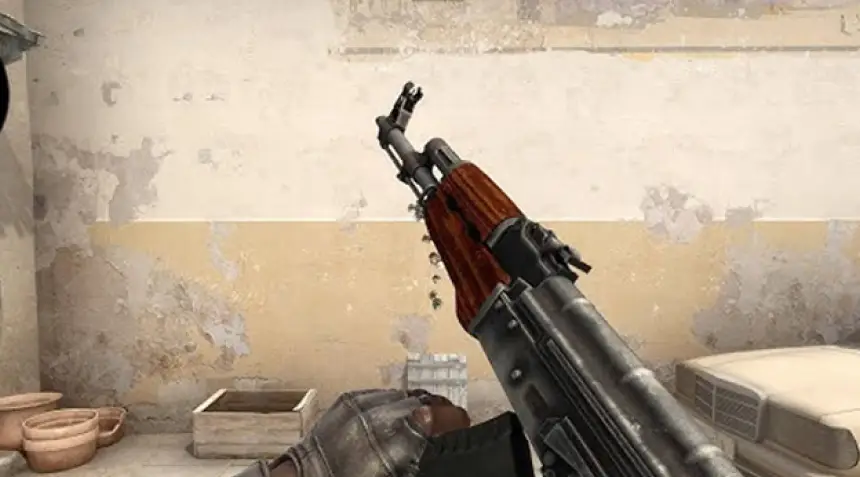
- Recoil Control: Each weapon has a distinct recoil pattern when fired. Learning to compensate for recoil improves accuracy.
- Bullet Spread: Depending on movement and stance in regards to firing: standing, crouching, and walking.
- Rate of Fire: Various weapons shoot at different speeds, making them more or less effective at different ranges.
Movement Systems

- Basic Controls: WASD keys control character movement while the mouse determines view direction.
- Advanced Techniques: Includes sliding, jumping, and crouching to avoid enemy fire.
- Movement Speed: Your accuracy typically decreases while moving, requiring strategic decisions about when to run versus walk.
Game Objectives
- Team Deathmatch: Focus on eliminating enemy players.
- Objective-Based: Capture points, plant/defuse bombs, or escort payloads.
- Battle Royale: Survive as the last player or team standing.
Key Skills to Master
Aim Precision
- Crosshair Placement: Position your aim where enemies are likely to appear.
- Target Tracking: Follow moving targets smoothly with your crosshair.
- Recoil Management: Control weapon kickback during sustained fire.
Map Knowledge
- Callouts: Learn common location names for effective team communication.
- Chokepoints: Identify narrow passages where encounters are likely.
- Spawn Points: Understand where players enter the map to predict enemy movement.
Cover Usage
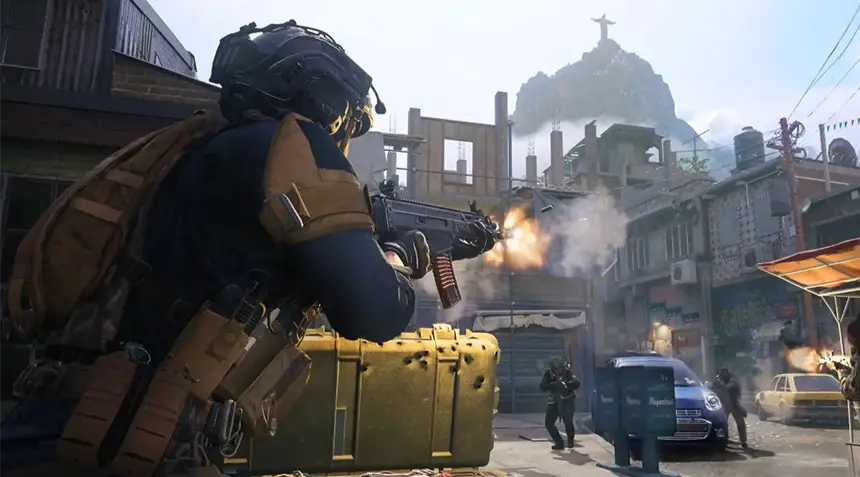
- Types of Cover: Distinguish between solid cover and penetrable surfaces.
- Peeking Techniques: Learn to check angles while minimizing exposure.
- Repositioning: Know when to change the cover to maintain tactical advantage.
FPS Games’ Combat Fundamentals: An In-Depth Guide
Mastering Shooting Mechanics
Shooting mechanics are the backbone of any FPS game, requiring precision, timing, and adaptability from the player.
- Aiming and Accuracy: Accurate aiming development is very important. Balance the quick reflex movements with sensitive settings of the game that will precisely target. The same can be achieved with a lot of practice over aim trainers or dedicating time in the actual game to hone the skills considerably.
- Recoil Control: Every weapon has its unique recoil pattern. Learning to counteract these patterns through subtle mouse or joystick movements will enhance your accuracy, especially in sustained firefights.
- Firing Modes: Different weapons support firing modes like single-shot, burst, or full-auto. Knowing when to use each mode based on distance and ammunition conservation is a game-changer.
- Hitboxes and Critical Zones: Targeting specific areas, such as the head or torso, ensures maximum damage. Understanding the enemy’s hitbox zones is crucial for consistent eliminations.
Movement and Positioning
Staying mobile and maintaining advantageous positions are essential for survival and victory.
- Strafing and Counter-Strafing: Constant movement during combat makes you a harder target to hit. Practice strafing side-to-side while timing your shots for increased combat efficiency. Counter-strafing (momentarily stopping movement for accurate shots) is particularly effective in tactical FPS games.
- Cover Usage: Always be aware of your surroundings. Use walls, barriers, and natural elements to reduce exposure and take cover when under fire. Peeking from cover while maintaining visibility on opponents is a fundamental skill.
- Verticality and Elevation: Most FPS maps have several levels. It is usually tactically advantageous to take the high ground because this affords a better vantage point on the battlefield and decreases vulnerability to melee attacks.
- Flanking and Rotations: Always think a step ahead. Flanking an enemy team or rotating to an advantageous position can often turn the tide of a match.
Weapon Management
Efficient weapon management involves understanding weapon types, mastering reload timing, and utilizing upgrades and attachments strategically.
Weapon Types:

- Assault Rifles: Versatile and effective at medium ranges. Perfect for balanced playstyles.
- Sniper Rifles: High-damage guns perfect for long-range combats but require precision and timing.
- Shotguns: Most destructive at close range, shotguns rule in close quarters.
- Submachine Guns: Fast-firing guns work great up to a middle range, but no farther.
- Light Machine Guns: These are good for suppressing the large mags but seem to sacrifice some mobility.
- Pistols: Reliable secondary weapons for quick switching when primary ammo runs out.
- Special Weapons: Grenade launchers, rocket launchers, and other specialized tools can deal massive damage or disrupt enemy strategies.
Reload Timing:
- Partial vs. Full Reloads: Reload strategically. Partial reloads preserve the remaining ammo in the magazine, while full reloads may waste bullets.
- Timing is Everything: Reloading in the open can leave you vulnerable. Reload behind the cover or after securing a safe position.
- Switch to Secondary Weapon: When in combat, instead of reloading, quickly switch to your secondary to remain in the action.
Attachments and Upgrades
- Scopes and Sights: Extend your lethal radius and precision with optics that fit the role of your gun.
- Barrels and Muzzles: Change recoil, damage range, and bullet velocity with the right attachment for the barrel or muzzle.
- Extended Mags: Increase your ammo capacity for extended fights.
- Grip Attachments: Reduce weapon sway and recoil for better stability.
- Perks and Special Upgrades: Certain games allow you to add perks or customizations, such as faster reload times or increased mobility while aiming.
Strategic Resource Management in FPS Games
Mastering FPS games involves not just the mechanics of aiming and reflexes but also strategy and management of the resources.
Often, it means the good handling of available resources: ammunition, health, and power-ups is just the line that separates good from poor performance.
Here’s how to optimize your resource management for better gameplay.
Ammo Conservation
Running out of ammunition during an intense battle usually makes you quite vulnerable. Here are some tips to help manage your ammo effectively:
- Prioritize High-Damage Shots: Aim for vital areas such as the head or weak points of enemies to maximize damage with fewer bullets.
- Avoid Wasteful Firing: Refrain from spraying your weapon unless necessary, especially when engaging at longer distances. Burst firing can improve accuracy and conserve ammo.
- Check Your Inventory: Regularly monitor your remaining ammo and plan your engagements accordingly. If you’re low, consider avoiding unnecessary fights until resupplied.
Health and Armor Management

Staying alive in FPS games often depends on how well you manage your health and protective gear:
- Monitor Status: Keep an eye on your health and armor bars to avoid being caught off guard during engagements.
- Strategic Usage of Pickups: Use health packs and armor strategically—don’t waste them when you’re only slightly damaged. Save them for critical situations or before challenging encounters.
- Avoid Overexposure: Take cover when under heavy fire to give yourself time to recover if your game offers regenerative health.
Effective Use of Power-Ups and Items
Power-ups and items can turn the tide of battle when used correctly:
- Timing is Key: Use power-ups, like damage boosters or speed increases, at pivotal moments such as pushing objectives or engaging multiple enemies.
- Plan for Synergy: Combine items strategically. For instance, activating a shield before entering a firefight can give you a significant edge.
- Don’t Hoard: While saving items for the perfect moment is tempting, using them proactively can prevent you from missing opportunities.
Pro FPS Games Tips for Beginners
Starting your FPS gaming journey can be challenging, but focusing on key aspects like aim, communication, composure, and self-improvement can set you on the path to mastery. Here’s how to elevate your gameplay effectively:
Aim Training Tools

Improving your targeting skills is fundamental to success in FPS games. Here are some tools and exercises to sharpen your aim:
Recommended Tools:
- Aim Lab (free): Customizable scenarios for various FPS games.
- Kovaak’s FPS Aim Trainer: Offers a library of drills tailored to specific skill sets.
- 3D Aim Trainer (browser-based): Accessible option with a focus on reaction times and precision.
Effective Exercises:
- Tracking Practice: Follow moving targets to enhance accuracy during movement.
- Flick Shots: Improve your reflexes by quickly snapping to targets.
- Crosshair Placement Drills: Keep your aim at head level while moving to reduce reaction time in engagements.
Communication is Key
FPS games often rely heavily on teamwork, and good communication can turn the tide of a match.
Effective Voice Chat Tips:
- Be Clear and Concise: Share only essential information, such as enemy positions, resource availability, or strategic plans.
- Avoid Negativity: Stay positive to foster a cooperative team environment.
- Use Callouts: Learn and use map-specific callouts to describe enemy locations.
Text Chat Usage:
- Ideal for players without microphones.
- Use pre-written or game-provided commands (e.g., “Enemy Spotted!”).
Stay Calm Under Pressure
Intense situations can test even experienced players. Remaining composed is a crucial skill.
Focus Techniques:
- Breathing Control: Deep breathing and exhaling slowly can help control your nerves.
- Mindset Reset: If it all gets too much, take a step away and reassess.
Pre-Battle Preparation:
- Stay Organized: Know your loadout and have a strategy in mind before engaging enemies.
- Limit Tunnel Vision: Stay aware of your surroundings rather than fixating on one enemy.
Review and Improve
Self-analysis is a powerful tool for growth in FPS games.
Watching Replays:
- Use built-in game replay systems or recording tools like OBS Studio to capture gameplay.
- Look for common mistakes, such as poor positioning, missed shots, or ineffective use of resources.
Analyzing Tactics:
- Note enemy strategies that worked against you and consider how to counter them.
- Pay attention to successful plays and replicate them in future matches.
Learning from Pros:
- Watch professional streams or tournaments to observe advanced tactics and positioning.
FPS Games Common Mistakes to Avoid
Even the very best and most professional gamers develop bad habits that hold them back. Here are the most common mistakes in first-person shooting and how to avoid them.
Over-Reliance on One Strategy
If you are always using the same tactics, then that just makes you predictable and easily taken down.
Reasons to Avoid:
- Opponents will learn your patterns and ways to counter them.
- Scenarios don’t all beget the same approach, which means what worked in one match may get you killed in another.
How to Avoid It:
- Be Flexible: Switch up play styles, weapons, and strategies.
- Study the Enemies: Adapt to how your opponents play by changing your play style.
- Learn Multiple Roles: If the game allows, try being a sniper, support, or front-line assault to broaden your skill set.
Neglecting Team Play
Most FPS games drive into teamwork, and disregarding coordination with your team will lead to defeats.
Reasons to Avoid:
- Lone-wolf tactics make you weak and reduce team effectiveness.
- This leads to missed opportunities or uncoordinated attacks.
How to Avoid It:
- Communicate Clearly: Use your voice or text chat to keep others informed with very important information such as the position of enemies or resources.
- Stay Together: Move with your team and do not roam alone; groups are much harder to eliminate.
- Support Your Buddies: Cover teammates, lay down suppressive fire, or assist with objectives to cement team cohesion.
Tunnel Vision
Fixating on a single enemy or objective often blinds you to surrounding threats.
Reasons to Avoid:
- You might miss an ambush or flank attack from other opponents.
- Your focus on one target can leave you exposed to the rest of the enemy team.
How to Avoid It:
- Practice situational awareness: Be constantly aware of your minimap and surroundings for potential threats.
- Peripheral Vision: Don’t focus your eyes only on the center of your screen; always keep an eye on the movement in your field of view.
- Reassess Often: During engagements, briefly disengage to ensure you’re not being flanked or surrounded.
Conclusion
Getting started with an FPS game is rather intimidating at first, but it pays off in due time if practice and strategy are concerned. Center yourself on learning the basics, and game styles that you will be trying on, and stop beating yourself over your skills improving. You can play FPS games in such a fun way to build up your reflexes, strategies, and teamwork at the same time.
Now, you need to take the Next Step in Your Gaming Adventure!
Enhance your skills with the Beginner Guide to PC Gaming Part 2, packed with tips for a special experience, and game recommendations for beginners.

FAQs
Which is more of a beginner-friendly FPS game?
Some examples of FPS games that have easy modes are Dead Island 2 and Halo Infinite; these games stress melee and cooperation, respectively. Other suggested entry games include Prodeus, Splatoon 3, and Bioshock.
What’s the most easy FPS game for a total beginner?
Well, Overwatch and Call of Duty: Warzone aren’t bad, but each game does have some kind of training mode to get beginners accustomed.
How do I improve my aim?
Use an aiming trainer like Kovaak’s FPS Aim Trainer or Aim Lab and practice.
What are the popular FPS games?
The popular FPS games Counter-Strike, Apex Legends, Valorant, and Halo dominate the FPS scene. You can enjoy all these exciting games with AR-Pay Gaming Gift Cards.

Aya Atef
I'm Aya, a content creator at ARPay, crafting engaging articles about payment gift cards, digital installments, and everything that makes online shopping seamless. Whether it's gaming top-ups or the latest e-commerce trends, I write to level up your shopping experience!

