


Quick action: if you want to buy after tuning your PUBG settings, start on AR-PAY.
Related reading: PUBG Mobile 4.3 Update, PUBG Best Weapons, PUBG Mobile Titles.
Commerce links: AR-PAY home, How to register on AR-PAY, Binance category.
Want to dominate in PUBG Mobile? It takes more than raw talent to be the last player standing. You need solid aiming, swift movement, and awareness. Often, players don’t consider their PUBG Mobile sensitivity settings.
Your sensitivity settings affect aiming, recoil control, and how the game feels. Getting it right is important. If sensitivity is too high, you’ll overcorrect. If too low, you’ll be sluggish. Finding the sweet spot makes aiming natural.
Finding the right sensitivity code can be tough. What works for one player might not work for another. This guide will help you understand the different sensitivity settings, how they affect your gameplay, and how to find the ideal setup for you.
Ready to improve your aim and get more of those “Winner Winner Chicken Dinner”? Let’s get started.
Stay informed about all PUBG Mobile updates and events in one place. Check the latest PUBG news on the ARPAY Blog.
Understanding Sensitivity Settings in PUBG Mobile
Sensitivity settings in PUBG Mobile control how fast your camera or crosshair moves when you swipe, tilt your device, or use a controller . Adjusting these settings can help improve aiming for headshots or when tracking moving targets .
It makes recoil easier to control, which is important in PUBG Mobile. Sensitivity impacts reaction speed for spotting enemies quickly . The goal is to find a balance . Setting sensitivity too high can mess up your aim, especially for headshots .
Types of Sensitivity Settings in PUBG Mobile
PUBG Mobile breaks sensitivity into scope-specific layers. Each controls how quickly your crosshair moves when that particular optic or view mode is active. Having the best mobility in PUBG Mobile means understanding each setting:
| Scope / View | What It Controls |
|---|---|
| TPP No Scope | Third-person free-look movement speed |
| FPP No Scope | First-person hip-fire tracking speed |
| Red Dot / Holographic / Aim Assist | Close-range ADS precision |
| 2x Scope | Short-mid ADS speed |
| 3x Scope | Mid-range tracking |
| 4x Scope / VSS | Mid-long range stability |
| 6x Scope | Long-range micro-adjustment |
| 8x Scope | Maximum range precision |
Setting any scope sensitivity too high causes recoil drift — the barrel climbs or swings unpredictably after the first shot. Setting it too low causes ADS mismatch — your scope moves slower than your thumb expects, causing you to overshoot the target manually.
How to Determine Your Ideal Sensitivity Settings
Gyroscope and touch responsiveness can differ widely from device to device. Rather than guessing, follow this process:
- Start with the preset for your device tier (see sections below).
- Enter Training Mode and fire 30 rounds at a stationary target at 50m with a 4x scope — no drag compensation.
- If bullets drift left or right consistently, adjust horizontal camera sensitivity ±5.
- If bullets climb faster than you can pull down, lower your ADS sensitivity by 5–10 points.
- Repeat with a moving target before taking the settings into an unranked match.
Attachments can reduce recoil and complement your sensitivity adjustments. It’s also recommended to practice with 5.56mm weapons — M416, SCAR-L, QBZ, and G36C — before moving to harder-to-control weapons like the AKM or Beryl M762.
Players can test in unranked matches or training fields before committing to ranked play.
Common Mistakes to Avoid with Sensitivity Settings
- Setting Sensitivity Too High: Moving too fast scatters shots, especially for headshots at range. If you find yourself constantly overshooting heads in close-quarters, your TPP/FPP no-scope sensitivity is likely too high.
- Ignoring Gyroscope: Don’t skip this tool. Gyroscope helps with more accurate aiming by tilting your phone. Most high-level mobile players use gyroscope for recoil control — but only after calibrating it independently from their touch sensitivity.
- Not Testing Changes: Changing settings without a structured testing session can leave you unready for ranked matches. Make one change at a time and test it for at least 15 minutes before evaluating.
- Copying Pro Codes Blindly: Pro sensitivity codes are optimized for high-end flagship devices with 120Hz displays. Importing them to a 60Hz mid-range phone will make the game feel sluggish or twitchy — always adjust by device tier first.
Don’t miss out on exploring PUBG Mobile Gift Card Discounts on AR-PAY – Get More for Less.
Don’t miss out on exploring PUBG Mobile Gift Card Discounts on AR-PAY – Get More for Less

Recommended Sensitivity Settings for Different Playstyles
- Select the right sensitivity:
- Lower sensitivity for close/mid-range.
- Higher sensitivity for long-range shots.
Setting Up Your Sensitivity in PUBG Mobile
Adjusting ADS and gyroscope settings can feel overwhelming for newcomers. Here are practical steps to calibrate your setup:
Scope calibration by distance:
- 100m: Place the chevron tip directly on the enemy’s body.
- 200m: Place the crosshair at the bottom of the target.
- 300m+: Move the notches down progressively as distance increases.
Practice regularly in Training Mode with different weapons, especially against moving targets. Use the target dummies on the obstacle course to simulate real engagement distances before applying new settings in live matches.
Aggressive Pubg Playstyle Sensitivity Settings
Low-End Devices (60Hz, <4GB RAM):
| Setting | Value |
|---|---|
| TPP No Scope | 85–90% |
| FPP No Scope | 80–85% |
| Red Dot / Holographic | 45–50% |
| 2x Scope | 28–32% |
| Gyroscope (ADS) | 100–110% |
Mid-Range Devices (60–90Hz, 4–6GB RAM):
| Setting | Value |
|---|---|
| TPP No Scope | 90–95% |
| FPP No Scope | 85–90% |
| Red Dot / Holographic | 50–55% |
| 2x Scope | 30–35% |
| Gyroscope (ADS) | 115–125% |
High-End / Flagship Devices (90–120Hz, 6GB+ RAM):
| Setting | Value |
|---|---|
| TPP No Scope | 95–100% |
| FPP No Scope | 90–95% |
| Red Dot / Holographic | 55–60% |
| 2x Scope | 35–40% |
| Gyroscope (ADS) | 125–135% |
Supportive Playstyle Pubg Sensitivity Settings
Support players need a balance of speed and precision to protect their teammates.
- Support players need a balance of speed and precision to track teammates, cover angles, and protect their squad under fire.Low-End Devices:
Setting Value 2x Scope 25–28% 3x Scope 18–22% 4x Scope / VSS 13–16% Gyroscope (ADS) 80–90% Mid-Range Devices:
Setting Value 2x Scope 28–32% 3x Scope 20–25% 4x Scope / VSS 15–18% Gyroscope (ADS) 90–100% High-End Devices:
Setting Value 2x Scope 32–38% 3x Scope 25–30% 4x Scope / VSS 18–22% Gyroscope (ADS) 100–115%
Sniper Playstyle Sensitivity Settings
Snipers benefit from lower sensitivity to maximize accuracy at long range .
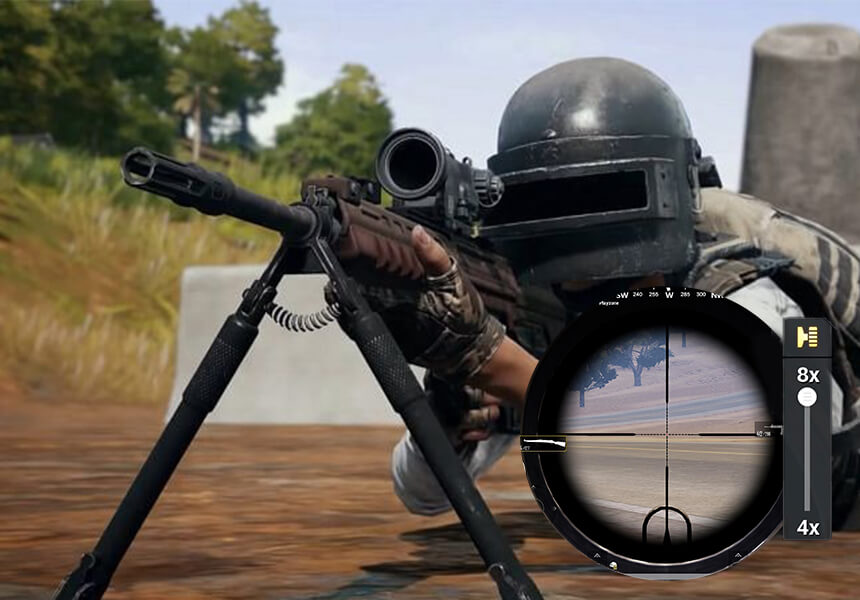
- Low-End Devices:
Setting Value 6x Scope 8–10% 8x Scope 8–10% Gyroscope (ADS) 50–60% Mid-Range Devices:
Setting Value 6x Scope 10–12% 8x Scope 10–12% Gyroscope (ADS) 60–70% High-End Devices:
Setting Value 6x Scope 12–15% 8x Scope 10–13% Gyroscope (ADS) 65–75%
Related Article: Master Every Genre: FPS Game 101 Guide for Beginner
Adjusting Sensitivity Settings Over Time
As your skills improve, you might find that your current sensitivity settings no longer suit you. This is normal — and it’s a sign of progress.
Common signs you’ve outgrown your settings:
- You’re consistently winning close-range fights but losing mid-range battles → lower your no-scope sensitivity by 5–8 points.
- You’re landing the first shot but losing spray duels → your ADS sensitivity may be too high, causing you to overcorrect during recoil.
- You feel “sticky” when flicking to new targets → increase TPP/FPP no-scope sensitivity by 5 points.
Continue refining your sensitivity until the game feels fully dialed in to your playstyle. Practice regularly in Training Mode and use unranked matches as your live testing ground — never test new settings in ranked for the first time.
To Add UC using PUBG gift cards you need to follow the 4 steps ARPAY Guide to redeem PUBG Gift Cards.
Conclusion
Finding the ideal PUBG Mobile sensitivity settings takes time and testing, but it’s worth the effort. Knowing how each setting affects your gameplay will help you fine-tune the game to your specific style. Practice often, adjust as needed, and watch as you climb those leaderboards!
Now that you’re armed with the secrets to sensitivity mastery, why not treat yourself to some in-game goodies? Get your PUBG Mobile gift card from Arpay today and unlock exclusive skins, weapons, and more!
FAQS
How can I improve my aim in PUBG Mobile?
Adjust PUBG Mobile Sensitivity code to improve Aim. One of the best ways to improve your aim is by adjusting the sensitivity .
What is the importance of crosshair placement?
Another crucial factor in improving the aim of PUBG Mobile is crosshair placement . Adjusting the crosshair position will improve aim in PUBG.
What are the best graphics settings for PUBG?
Best PUBG Mobile graphics settings:
- Render scale: 100.
- FPP Field of view: 103.
- Overall graphics quality: Custom.
- Anti-aliasing: Ultra.
- Post-processing: High.
- Shadows: Low.
- Textures: Ultra.
- View distance: High.
What sensitivity settings should I use for PUBG Mobile on a low-end phone?
For low-end devices (60Hz, under 4GB RAM), start with TPP No Scope at 85–90%, FPP No Scope at 80–85%, and keep scope sensitivities conservative , 4x at 13–16% and 6x/8x at 8–10%. Lower refresh rates amplify sensitivity, so starting lower prevents over-aiming.
Why does my aim drift sideways when I fire in PUBG Mobile?
Horizontal aim drift during recoil is usually caused by gyroscope miscalibration or a horizontal camera sensitivity that’s too high. First, recalibrate your gyroscope in PUBG Mobile’s settings. Then reduce your ADS sensitivity by 5–10 points and test again in Training Mode.
What is the best sensitivity for headshots in PUBG Mobile?
Headshots require a balance between snap speed and control. Most competitive players use TPP/FPP no-scope between 85–100% and Red Dot at 45–55%. The exact value depends on your device , high-end phones with 120Hz displays can handle the upper range without over-aiming.
How can I improve my aim in PUBG Mobile?
Adjusting your sensitivity code is the foundation, but consistent improvement also requires crosshair pre-placement, regular training mode sessions with moving targets, and using stable weapons like the M416 or SCAR-L while learning. Fix your sensitivity first, then build muscle memory around it.
What is the importance of crosshair placement in PUBG Mobile?
Crosshair placement reduces how far you need to move your thumb to reach an enemy’s head. By keeping your crosshair at head height as you move through the map, you can land a headshot with minimal adjustment , making your effective sensitivity feel faster without changing any settings.
What are the best graphics settings for PUBG Mobile to support aiming?
Lower graphics reduce visual noise and improve frame stability, which directly supports consistent aiming. Recommended settings: Render Scale 100, FPP Field of View 103, Anti-Aliasing Ultra, Textures Ultra, Shadows Low, Post-Processing Medium, View Distance High. Keeping shadows on Low is especially important , it removes distracting ground artifacts that can obscure enemy feet.
Should I use gyroscope in PUBG Mobile?
Yes, gyroscope is the most effective recoil control tool available on mobile. Set it to “Scope On” mode initially so it only activates when you ADS, then calibrate gyroscope sensitivity separately from your touch sensitivity. Most mid-to-high level players use gyroscope exclusively for spray control.


Use this method on AR-PAY
Keep the sensitivity guide for gameplay, then use AR-PAY when you are ready to buy.
Visit AR-PAY or use the related PUBG links above.

Hager Hesham
Content Writer and your go-to gaming expert. I'm here to share my best practices, valuable strategies, and professional gamer guidance. Also, I'm a gem hunter for the best deals and gift cards, just to enjoy games at almost zero cost with AR-pay.

