

Recharge Mobily with ARPAY gift cards – the fastest way to top up your account when credit runs low.
- Why Use ARPAY to Recharge Mobily?
- What You Need Before You Start Recharging Your Mobily Through AR-Pay
- How to Recharge Mobily Using ARPAY Gift Cards
- How to Check the Available Balance on Mobily Sim Card
- How to Recharge Mobily Smoothly | 3 Secret Tips
- Troubleshooting Common Issues For Recharging Mobily Sim Card Through AR-Pay
- Conclusion
- FAQs
Running out of mobile credit always happens at the worst possible moment. When your Mobily line needs a quick top-up, ARPAY gift cards offer the smartest solution around.
Mobily serves millions across Saudi Arabia as a leading telecom provider. Whether you’re calling family, streaming content, or handling work calls, keeping your account funded keeps you connected.
ARPAY gift cards eliminate the hassle of finding physical stores or standing in queues. You can top up your account from anywhere in just a few clicks, with your balance updating instantly.
This guide shows you exactly how to purchase and use ARPAY gift cards for Mobily top-ups. You’ll learn the complete process, troubleshooting tips, and smart ways to check your balance afterward.
Why Use ARPAY to Recharge Mobily?
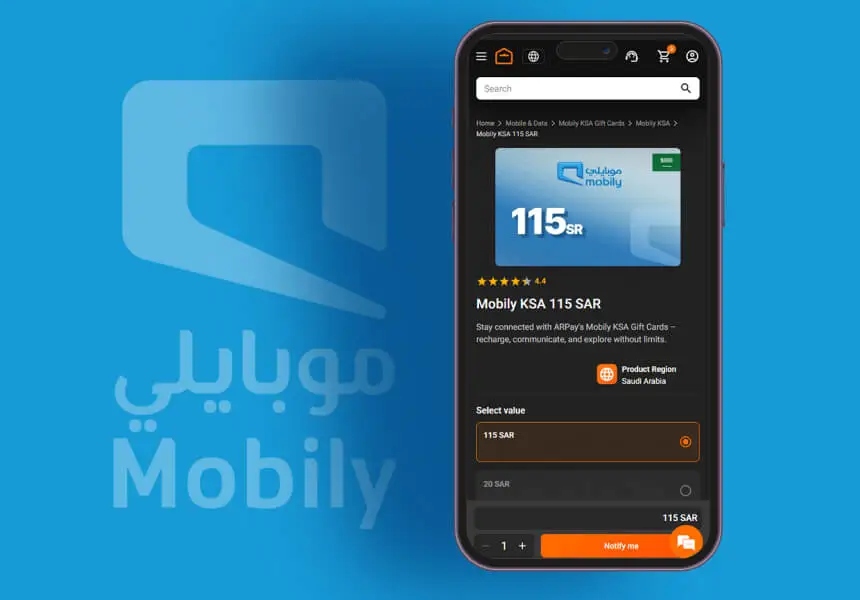
Choosing the right platform for your mobile recharge makes all the difference. ARPAY has earned its reputation as a reliable partner for Mobily users across Saudi Arabia.
Trusted Digital Gift Card Provider
ARPAY operates with full transparency and security standards that protect your transactions. Thousands of customers rely on their services daily, and their track record speaks volumes about reliability.
Instant Delivery and Round-the-Clock Availability
Your Mobily recharge doesn’t have to wait for business hours. ARPAY delivers gift cards instantly, whether it’s 3 AM or during a busy afternoon. Your mobile credit arrives within minutes of purchase.
Multiple Secure Payment Options
Choose from various payment methods that suit your preferences:
- Credit and debit cards from major providers
- Bank transfers for added security
- Digital wallets for quick transactions
- Local payment solutions tailored for Saudi users
Seamless User Experience
The ARPAY platform keeps things simple without sacrificing functionality. Clean interfaces, clear instructions, and responsive customer support ensure your recharge process stays stress-free from start to finish.

What You Need Before You Start Recharging Your Mobily Through AR-Pay
Getting everything ready upfront saves time and prevents frustration later. Think of this as your pre-flight checklist before takeoff.
Your Mobily Account Details
- Active Mobily prepaid number – Make sure your line hasn’t expired or been suspended
- Your registered mobile number – Keep it handy for verification steps
- Account information – Know whether you’re using prepaid or postpaid services
Access Requirements
- Stable internet connection – ARPAY’s website works best with reliable connectivity
- Web browser or mobile device – Both desktop and mobile versions work smoothly
- Valid email address – You’ll receive purchase confirmations and receipts here
Payment Preparation
- Chosen payment method – Credit card, debit card, or digital wallet
- Sufficient funds – Check your payment source has enough balance
- Valid Mobily recharge gift card from ARPAY – This becomes your golden ticket to instant top-ups
Once you’ve gathered these essentials, the actual recharge process becomes refreshingly straightforward. No surprises, no missing pieces, just smooth sailing from start to finish.
How to Recharge Mobily Using ARPAY Gift Cards
The actual recharge process is refreshingly simple once you know the steps. Here’s your roadmap to getting those precious minutes and data back on your Mobily account.
Step 1: Access the ARPAY Platform
Head over to the ARPAY website. And pick whichever feels more comfortable for your current situation.
Step 2: Find Mobily Recharge Cards
Look for the telecom section on the main page. You’ll spot Mobily among the available operators – it’s usually featured prominently since it’s one of the most popular choices.
Step 3: Choose Your Recharge Amount
ARPAY offers several denominations to match different needs:
- Small top-ups: Perfect for emergency calls or quick data boosts
- Medium amounts: Great for regular monthly usage
- Larger packages: Ideal for heavy users or family accounts
Pick the amount that matches your usage patterns and budget.
Step 4: Complete Your Purchase
The checkout process walks you through payment options. ARPAY accepts various methods, so you can pay however works best for you. Once payment goes through, you’ll receive your gift card details via order page instantly.
Step 5: Apply the Card to Your Mobily Account
In the order page, You’ll find a unique recharge code along with simple instructions. Follow the provided steps to add the credit directly to your Mobily line. Your balance should update almost immediately.
How to Check the Available Balance on Mobily Sim Card
Your recharge went through, but you want to double-check everything worked perfectly. Smart thinking! Confirming your Mobily balance takes seconds and gives you peace of mind.
Check Balance via USSD Code
The fastest way to see your current balance requires no internet connection. Just grab your phone and follow these steps:
- Dial *1411# on your Mobily device
- Press the call button and wait a moment
- Your available balance appears directly on your screen
- Write down the amount if you need it for reference later
Using SMS to View Your Balance
Prefer text messages over USSD codes? This method works just as well and leaves you with a written record:
- Open your messaging app
- Send the number 1 to 1411
- Wait for the reply message with your current balance
- Save the message if you want to track your usage patterns
Mobily App Balance Check
The official Mobily app gives you the most detailed view of your account. Here’s how to access your information:
- Download and open the Mobily app on your phone
- Log in using your account credentials
- Your balance displays prominently on the home screen
- Tap for additional details about your plan and usage
Online Balance Verification
You can check your balance from a computer or tablet. The Mobily website makes this simple:
- Visit the official Mobily website
- Sign into your personal account
- Navigate to your account dashboard
- View your current balance alongside usage statistics and plan details
Each method gives you the same accurate information, so pick whichever feels most convenient for your situation.
How to Recharge Mobily Smoothly | 3 Secret Tips
Getting your Mobily recharge right the first time saves you headaches later. These practical tips help you avoid common mistakes that can delay your top-up or cause frustration.
Double-Check Your Recharge Code
Your ARPAY gift card comes with a unique recharge code that’s your ticket to more credit. Take a moment to verify each digit before hitting submit. One wrong number can send your recharge into digital limbo.
- Type the code slowly and compare it against the original
- Use good lighting when reading the code from your screen or printout
- Copy and paste when possible to avoid typing errors
- Keep the code visible until you see the success confirmation
Verify Your Mobily Number Status
An inactive Mobily line won’t accept recharge attempts, leaving you puzzled about why your credit isn’t showing up. Check your line status before starting the recharge process.
- Make a quick test call to confirm your line works
- Check if you’ve received any suspension notices from Mobily
- Ensure your SIM card is properly inserted and recognized
- Contact Mobily support if your line seems inactive
Secure Your Recharge Code
Treat your ARPAY recharge code like cash – once someone else uses it, your money is gone. Keep these codes safe until you’re ready to apply them to your account.
- Never share codes on social media or messaging apps
- Use codes promptly to avoid expiration issues
If you’re into games, This is a must read: Mobily Gaming Portal: Play More, Stress Less
Troubleshooting Common Issues For Recharging Mobily Sim Card Through AR-Pay
Even the smoothest recharge process can hit a snag. Don’t panic when things go sideways – most problems have simple fixes that get you back on track quickly.
What to Do If Your Recharge Code Fails
Your gift card code should work on the first try, but sometimes technology has other plans. Here’s how to handle code failures:
- Double-check every digit and letter in your recharge code – mixing up similar characters like 0 and O happens more often than you’d think
- Make sure you’re entering the code in the correct format without extra spaces or dashes
- Try logging out of your ARPAY account and logging back in before attempting the recharge again
- Clear your browser cache or restart the ARPAY app if you’re using mobile
- Wait 10-15 minutes before trying again, as system delays can cause temporary failures
How to Correct a Mistyped Mobily Number
Entering the wrong phone number ranks as the most common recharge mistake. Here’s your action plan:
- Contact ARPAY customer support immediately if you realize the error right after purchase
- Provide your transaction details and the correct Mobily number you intended to recharge
- Keep screenshots of your purchase confirmation as proof of the transaction
- Most providers can reverse incorrect recharges within 24-48 hours if caught early
- Prevention works better than correction – always verify your number twice before confirming
ARPAY Refund and Cancellation Policies
Sometimes you need your money back, and that’s perfectly normal. ARPAY handles refunds with specific guidelines:
- Unused gift card codes can typically be refunded within 7 days of purchase
- Processing errors on ARPAY’s end qualify for immediate refunds regardless of timing
- Refunds for user errors depend on whether the code has been activated or used
- Bank processing times vary, but most refunds appear within 3-5 business days
- Keep all purchase receipts and transaction IDs until your refund processes completely
Most recharge problems stem from simple oversights rather than serious technical issues. Take a deep breath, check the basics first, and reach out for help when you need it.
Read More: Mobily Direct Billing: Transforming Digital Payments in KSA
Conclusion
Recharging your Mobily account shouldn’t feel like a chore. ARPAY gift cards offer instant delivery, secure payments, and 24/7 availability that physical stores simply can’t match.
Your time is valuable. Skip the store visits and long queues. ARPAY puts Mobily recharges at your fingertips, whether you’re at home, work, or anywhere with internet access.
Ready to experience hassle-free Mobily recharges? Visit ARPAY today and see how quick and simple mobile top-ups can be.

FAQs
What should I do if my ARPAY gift card code doesn’t work?
Double-check that you’ve entered the code correctly without any extra spaces. Make sure your Mobily number is active and hasn’t been suspended. If the problem continues, contact ARPAY customer support with your purchase receipt.
How long does it take for my Mobily balance to update after using an ARPAY gift card?
ARPAY processes Mobily recharges almost instantly. Your balance should appear within 1-2 minutes. If it takes longer than 5 minutes, check your connection and try dialing *1411# to refresh your balance.
Can I use ARPAY gift cards to recharge any Mobily number?
Yes, you can recharge any active Mobily prepaid number using ARPAY gift cards. Just make sure you enter the correct mobile number during the purchase process.
Do ARPAY gift cards expire?
ARPAY gift cards typically have an expiration date printed on them or mentioned in your purchase confirmation. Use them before this date to avoid losing your money.
What payment methods does ARPAY accept for gift card purchases?
ARPAY accepts cash, debit cards, and various online payment methods for gift card purchases. Check their website for the most current payment options.
Can I get a refund if I accidentally buy the wrong amount?
Refund policies vary depending on whether the card has been used. Contact ARPAY customer service immediately if you need to cancel or modify an unused purchase.
How do I check if my Mobily recharge was successful?
Dial *1411# and press send to receive a text with your current balance. You can also check through the Mobily app or website after logging into your account.

Hager Hesham
Content Writer and your go-to gaming expert. I'm here to share my best practices, valuable strategies, and professional gamer guidance. Also, I'm a gem hunter for the best deals and gift cards, just to enjoy games at almost zero cost with AR-pay.

