


Playing Breath of the Wild or Super Mario Odyssey on your phone is now possible thanks to Nintendo Switch emulators for Android. These emulators allow your smartphone to replicate the Switch’s internal systems, making it possible to run your favorite Switch games directly on your Android device.
- What Is a Nintendo Switch Android Emulator?
- Can You Really Play Nintendo Switch Games on Android?
- Legal & Safety Disclaimer (Read This First)
- Why Gamers Want Switch Emulation on Android
- Popular Nintendo Switch Android Emulators
- Which Emulator Should You Use? Find Your Match in 60 Seconds
- System Requirements for Android Devices
- How to Install and Use a Switch Emulator on Android
- Common Issues and Fixes
- Pros and Cons of Switch Android Emulators
- Conclusion
- FAQs
With modern smartphones packing impressive processing power, you can enjoy console-quality gaming without the need for dedicated hardware. Whether you’re on the go or just relaxing at home, these emulators provide an easy way to take your gaming experience anywhere.
In this article, you’ll know all the details of the best Nintendo Switch emulators for Android, how to install them, and how to troubleshoot common issues to ensure a smooth gaming experience.
What Is a Nintendo Switch Android Emulator?
Emulators work by translating the Switch’s ARM-based instructions into commands your Android device can understand. Think of it as a digital translator that converts Nintendo’s native code into Android-friendly language.
Modern Android phones now rival gaming consoles in raw processing power. Flagship Snapdragon processors and Mali GPUs can handle the computational demands of Switch games, though performance varies significantly between titles.
Key differences exist between Android and PC-based emulators:
- PC like Yuzu and Ryujinx offer superior performance and compatibility
- Android prioritize portability and convenience over raw power
- Mobile limitations include thermal throttling and battery constraints

Can You Really Play Nintendo Switch Games on Android?
Yes — and on the right device, it works better than you’d expect. Modern flagship Android phones pack enough processing power to run many Switch titles smoothly. But there’s a catch: not every emulator suits every phone, and doing this legally requires a few extra steps most guides skip over.
This guide cuts through the noise. You’ll find an honest performance comparison, a device compatibility matrix, clear legal guidelines, and a straightforward setup walkthrough — so you can get gaming without surprises.
Legal & Safety Disclaimer (Read This First)
Before diving in, here’s what you need to know:
- Emulators are legal. Downloading and running a Switch emulator on your Android device does not violate any law in most countries.
- Game ROMs are where legality matters. You may only play games you legally own — either purchased digitally from the Nintendo eShop or dumped from physical cartridges you own. Downloading ROMs from third-party sites is copyright infringement, regardless of how it’s framed.
- Only download emulators from official or verified sources. Unofficial APKs from random download sites frequently bundle malware. Stick to the project’s official GitHub page or established community forums.
The rest of this guide assumes you’re working within these boundaries.
Why Gamers Want Switch Emulation on Android
PPortability drives the main appeal of Switch emulation on phones. You can play Breath of the Wild during your commute without carrying extra hardware or worrying about the Switch’s battery life. With the recent update to Nintendo Switch 21.1.0, new emulation features have made it even more seamless to play on the go.
Enhanced features attract enthusiasts who want more control over their gaming experience:
- Higher resolutions beyond the Switch’s 720p handheld limit
- Custom modifications and community-made content
- Cheat codes and save state functionality
- Performance tweaks for smoother gameplay
Community curiosity fuels development as programmers push mobile hardware to its limits. These projects showcase what’s possible when dedicated developers tackle complex technical challenges.
Ready to unlock even more gaming perks? Grab your Nintendo Switch Online Membership gift cards now and enjoy exclusive access to online multiplayer, classic games, and more, all from your Android device!
Popular Nintendo Switch Android Emulators
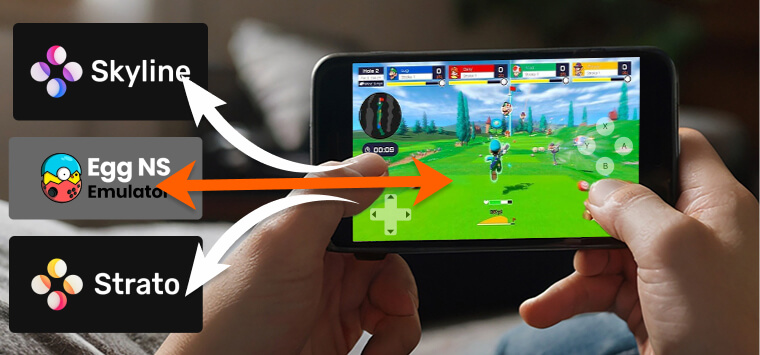
Several emulators compete for attention in the Android Switch emulation space, each with distinct strengths and limitations.
| Emulator | Best For | Device Tier | Compatibility | Status |
| Yuzu (Android) | Flagship performance, 1080p+ gaming | Snapdragon 888+ / 12GB+ RAM | Excellent | Active |
| Egg NS | High-end devices, wide game library | Snapdragon 855+ / 8GB RAM | Good | Active |
| Strato | Mid-range devices, improved Skyline fork | Snapdragon 700–800 / 6GB RAM | Moderate | Active (early builds) |
| Skyline | Older/lower-spec devices, lightweight | Snapdragon 600s / 3–4GB RAM | Limited | Discontinued (functional) |
Key Features
Controller support remains essential for authentic gameplay experiences. Most emulators recognize Joy-Con controllers via Bluetooth, plus popular third-party gaming controllers from Xbox and PlayStation.
Graphics and performance options let users balance visual quality with smooth operation:
- Resolution scaling from native 720p up to 1080p or higher
- Frame rate caps to prevent overheating
- Texture filtering for sharper image quality
- Shader compilation management for reduced stuttering
Save states provide convenience features absent from original hardware. You can save your progress anywhere and reload instantly, perfect for mobile gaming sessions.
Multiplayer and online features face significant limitations on mobile emulators. Most networking functions don’t work, restricting you to single-player experiences.
Which Emulator Should You Use? Find Your Match in 60 Seconds
Your Phone is a Flagship (Snapdragon 888 or newer / 12GB+ RAM)
Use Yuzu for Android
Yuzu delivers the best overall experience on high-end hardware: stable frame rates, support for 1080p and above, and broad game compatibility. If you want to play demanding titles like The Legend of Zelda: Breath of the Wild or Super Mario Odyssey at their best, this is your emulator.
Your Phone is High-End (Snapdragon 855–865 / 8GB RAM)
Use Egg NS
Egg NS offers solid compatibility with popular AAA Switch titles and performs well on high-end mid-tier devices. It requires a trusted installation source — download only from the official Egg NS site or verified community repositories.
Your Phone is Mid-Range (Snapdragon 700–800 / 6GB RAM)
Use Strato
Strato is a fork of the now-discontinued Skyline emulator with meaningful performance improvements. Early builds show better frame rates and stability for moderately demanding games like Hollow Knight or Super Mario Odyssey on mid-tier hardware.
Your Phone is Older or Budget (Snapdragon 600 series / 3–4GB RAM)
Use Skyline (with realistic expectations)
Although officially discontinued, Skyline’s codebase remains functional and is the lightest option available. Expect acceptable performance on less demanding titles like Pokémon: Let’s Go or Mario Kart 8 Deluxe, but don’t expect miracles on low-spec hardware.
System Requirements for Android Devices
Minimum specifications determine whether your phone can handle Switch emulation acceptably:
- CPU: Snapdragon 855 or equivalent ARM processor
- RAM: 6GB minimum, 8GB recommended
- Storage: 64GB free space for games and system files
- Android: Version 8.0 or newer
Storage space becomes critical when dealing with large Switch game files. Popular titles consume 10-15GB each, requiring ample internal or external storage capacity.
How to Install and Use a Switch Emulator on Android
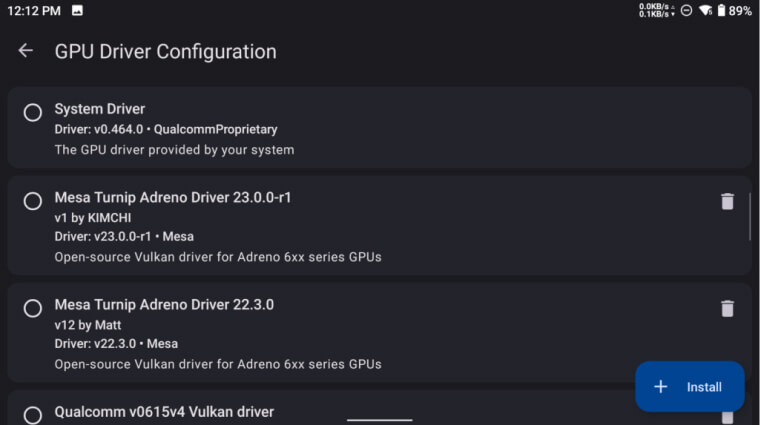
Installation requires careful attention to security and legality throughout the process.
- Step 1: Download the emulator APK from official project websites or trusted community forums. Avoid random download sites that might bundle malware with legitimate software.
- Step 2: Install system firmware legally dumped from your own Switch console. This process requires technical knowledge and specialized homebrew software on your Switch.
- Step 3: Transfer game files that you legally own through cartridge or digital purchase. Games must be dumped from your personal library, not downloaded from file-sharing sites.
- Step 4: Configure control schemes and graphics settings based on your device’s capabilities. Start with conservative settings and gradually increase quality until performance becomes unstable.
- Step 5: Launch games and adjust settings as needed for optimal performance. Each game may require different configurations for best results.
Safe downloading practices protect your device from malicious software disguised as emulators. Stick to established community sources and read user reviews before installing anything.
Get the most out of your Nintendo Switch emulation experience with a Nintendo Switch Online Membership! Choose the 3-month or 12-month membership and enjoy online play, classic games, and exclusive perks all year long!
Common Issues and Fixes
If you’re experiencing issues with your emulator, here are some common problems and solutions:
- Black Screen on Launch:
- Solution: Check if your emulator is updated to the latest version. If the issue persists, try restarting the app or reconfiguring the graphics settings.
- Lag or Low Frame Rate:
- Solution: Lower the resolution settings or disable some graphic enhancements like texture filtering and anti-aliasing. You may also want to limit the frame rate to prevent overheating.
- Frequent Crashes:
- Solution: Ensure your Android device meets the minimum system requirements for the emulator. Try closing other background apps to free up resources. If the problem continues, consider reinstalling the emulator.
If you’re encountering specific Nintendo Switch Error Codes, consult the emulator’s troubleshooting guide for more detailed instructions.
Pros and Cons of Switch Android Emulators
Pros:
- Extreme portability without carrying additional hardware
- Customization options unavailable on original Switch
- Enhanced graphics capabilities on high-end phones
- Save state functionality for convenient gaming sessions
Cons:
- Performance inconsistencies across different games
- Limited compatibility with newer or complex titles
- Legal complexity surrounding game acquisition
- Thermal throttling during extended gaming sessions
Battery drain becomes problematic during intensive emulation sessions. Most phones struggle to maintain performance while running demanding Switch games for extended periods.
Heat generation affects both comfort and performance during gameplay. Sustained emulation pushes mobile processors beyond their normal operating parameters.
Read more: Nintendo Switch Error Codes: Complete List and Solutions
Conclusion
Switch Android emulators push mobile gaming boundaries while raising important questions about software ownership and digital rights. These projects demonstrate impressive technical achievements despite significant legal and practical limitations.
Use emulators responsibly and respect copyright laws when acquiring games. Support game developers through legitimate purchases while exploring the technical possibilities of mobile emulation.
Ready to get your Nintendo eShop cards hassle-free? Visit ARPAY now for instant delivery and start downloading your favorite games today!

FAQs
What is the best Nintendo Switch emulator for Android?
The best Nintendo Switch emulator for Android depends on your device’s performance. For low-end devices, Skyline Emulator is a good choice. For mid-range devices, Strato Emulator offers better optimization. Egg NS Emulator is recommended for high-end devices, while Yuzu for Android is ideal for flagship devices, offering top-tier performance for graphically demanding games.
How do I download Nintendo Switch emulators for Android safely?
Always download emulators from trusted sources such as official project websites or reputable community forums. Avoid downloading from random sites to prevent malicious software from compromising your device. Stick to well-reviewed and verified emulators to ensure a secure installation.
Can I play all Nintendo Switch games on an Android emulator?
While many Switch games are compatible with Android emulators, performance and compatibility can vary. 2D and less demanding games like Pokémon Let’s Go or Super Mario Odyssey work well, but more complex, graphically intensive titles like The Legend of Zelda: Breath of the Wild may face frame rate drops or performance issues, especially on lower-end devices.
Is it legal to use a Nintendo Switch emulator on Android?
Yes, using the emulator itself is legal, as long as you follow copyright laws regarding game ROMs. You must only use ROMs from games you legally own, either through physical cartridges or digital purchases. Downloading ROMs from unauthorized sites is illegal and violates copyright laws.
Can I use my Nintendo Switch controllers with Android emulators?
Yes, most Nintendo Switch emulators on Android support Bluetooth pairing with Joy-Con controllers. You can also use other controllers such as Xbox and PlayStation controllers for a better gaming experience.
How do I fix lag or crashes on a Nintendo Switch emulator for Android?
To fix lag or crashes, ensure your Android device meets the system requirements for the emulator. If you’re experiencing lag, try lowering the resolution or disabling graphic enhancements like texture filtering. For crashes, close other apps to free up resources, and consider reinstalling the emulator if the issue persists.

Hager Hesham
Content Writer and your go-to gaming expert. I'm here to share my best practices, valuable strategies, and professional gamer guidance. Also, I'm a gem hunter for the best deals and gift cards, just to enjoy games at almost zero cost with AR-pay.

