


If you’re a Game Pass user, you probably felt that hit in your wallet. Microsoft just rolled out one of the biggest price increases in the service’s history, and it’s not just a dollar or two we’re talking about. Some tiers saw jumps of 40% to 50%, while the entire structure got a makeover with new names and features.
- Xbox Game Pass Price Increase Explained: What Really Changed
- Why Microsoft Raised Xbox Game Pass Prices
- Gamers React to the Xbox Game Pass Price Hike
- Is Xbox Game Pass Still Worth It? Tier-by-Tier Breakdown
- PC Game Pass: Still Worth It for PC-Only Players?
- Smart Tips to Save Money on Xbox Game Pass
- What the Xbox Game Pass Price Increase Means for Gaming Subscriptions
- Conclusion
- FAQs
For gamers trying to stretch their budget, this matters. Game Pass became popular because it offered hundreds of games for the price of one new release. Now that the cost is climbing, the question isn’t just “what changed?” but “should I keep paying for this?”
Let’s break down what’s different, where your money goes now, and whether each tier still makes sense for your wallet.
Xbox Game Pass Price Increase Explained: What Really Changed
Microsoft didn’t just raise prices. They redesigned the whole system with new tier names and different feature sets.
The New Tier Names
- Game Pass Core is now called Essential
- Standard got upgraded to Premium
- The top tier keeps the same name but adds new perks
The Price Jumps
Here’s where it stings:
- Essential: Stays at $9.99/month
- Premium: Stays at $14.99/month but includes more features
- Top Tier: Jumped from $19.99 to $29.99/month (a 50% increase)
- PC Game Pass: Rose from $11.99 to $16.49/month (roughly 40% more)
That $10 monthly increase on the highest tier adds up to $120 extra per year. For budget-conscious gamers, that’s two full-price games you could buy instead.
What You Get in Each Tier
Essential ($9.99/month)
- Access to 50+ games
- Works on both PC and console
- Cloud streaming included
- No day-one releases
Premium ($14.99/month)
- Library of 200+ games
- Cloud streaming access
- Cross-platform play
- Earn store credit through gameplay
- Still no day-one releases
Top Tier ($29.99/month)
- 400+ game library
- Day-one access to new releases
- Ubisoft Plus Classics included
- Fortnite Crew membership
- Earn up to $100/year in store credit
- Improved cloud quality at 1440p
- Better streaming bitrate
The Extras That Sweeten (Or Don’t) the Deal
Microsoft added reward systems where you earn store credit just for playing games. Top tier subscribers can bank up to $100 yearly, which softens the blow slightly. They also bundled in Ubisoft Plus Classics and improved cloud streaming to 1440p with better bitrate.
But here’s the catch: these perks only matter if you actually use them.

Why Microsoft Raised Xbox Game Pass Prices
Companies don’t raise prices 50% without reasons. Microsoft’s betting that more features across all tiers will justify the cost. They’ve been spending heavily on catalog expansion, signing deals with third-party publishers, and funding first-party studios.
They’re also trying to unify PC, console, and cloud gaming into one ecosystem. That infrastructure costs money to run. Streaming games requires servers, bandwidth, and maintenance. Licensing deals with publishers take a cut. Day-one releases mean Microsoft pays developers upfront instead of waiting for sales.
The previous pricing model apparently wasn’t sustainable. Microsoft needed to either cut features or raise prices. They chose the latter.
Gamers React to the Xbox Game Pass Price Hike
The response has been mixed, leaning toward frustrated. Social media lit up with complaints about the 50% jump on the top tier. Many subscribers feel blindsided, especially those who joined specifically because of the value proposition.
Some comparisons to competitors don’t help Microsoft’s case. PlayStation Plus Extra costs $14.99/month with a solid library, though without day-one releases. Nintendo Switch Online maxes out at $49.99/year. EA Play is $4.99/month. Suddenly, Game Pass looks less like a bargain and more like a premium service.
Outside the US, currency conversions make this even harder to swallow. In regions where gaming already costs more relative to income, a 50% price hike can mean the difference between subscribing and canceling.
Is Xbox Game Pass Still Worth It? Tier-by-Tier Breakdown
Let’s get practical. Your decision should match your gaming habits and budget.
Xbox Game Pass Essential: The Budget-Friendly Choice
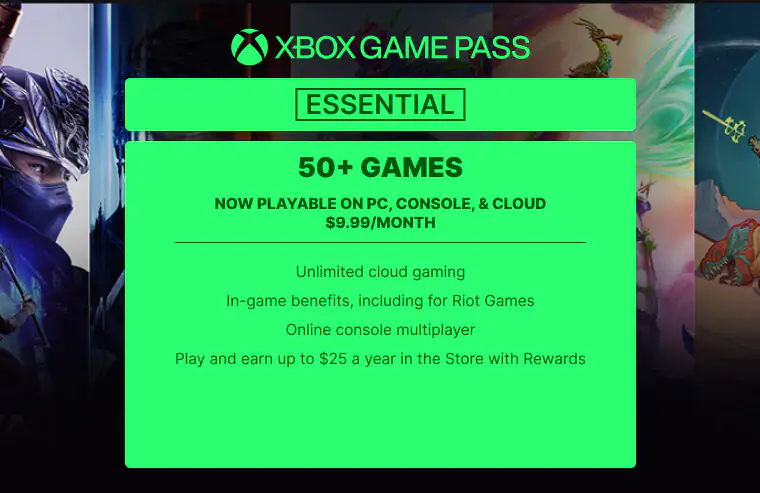
At $9.99, this tier now includes cloud streaming and 50+ games across PC and console. That’s decent value if you’re a casual player who doesn’t care about new releases. You’ll have enough variety to stay entertained without breaking the bank.
Good for: Casual gamers, those testing the service, or anyone on a tight budget who wants some cloud access.
Skip if: You want new games on release day or need access to the full library.
Xbox Game Pass Premium: The Middle-Ground Option
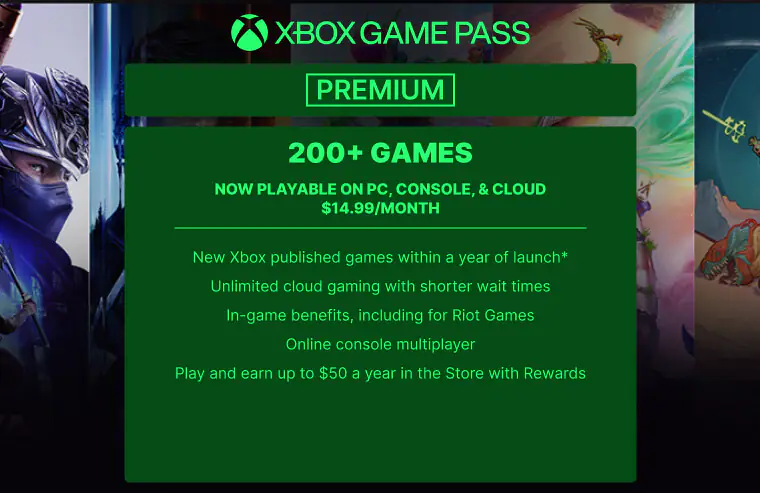
Premium sits in an awkward spot. You get 200+ games, cloud access, and can earn rewards. But you still don’t get day-one releases, which is arguably the biggest selling point of the service.
For $14.99, you’re paying $5 more than Essential for 150 extra games and reward earning. That’s not bad, but it’s not compelling either unless you specifically need those mid-tier titles.
Good for: Regular players who work through backlogs and want more variety than Essential offers.
Skip if: You’re budget-conscious or you specifically want new releases (in which case, jump to the top tier or skip entirely).
Xbox Game Pass Ultimate: For Hardcore, All-In Gamers
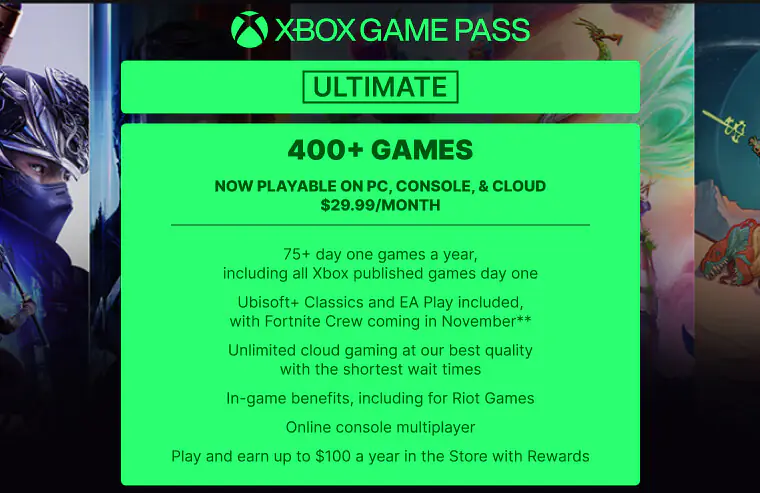
At $29.99, this is expensive. But if you play 2-3 new releases per year through the service, you’re technically breaking even since new games cost $60-70. Add the $100 yearly rewards potential, and heavy users might still find value.
The question is: do you actually play that many new games? If you’re someone who jumps on every major release and uses cloud streaming regularly, the math might work. If you play one game for months at a time, you’re overpaying.
Good for: Heavy gamers who want every new release, use cloud features, and play across multiple devices.
Skip if: You focus on one or two games at a time, rarely play new releases, or can’t stomach the monthly cost.
PC Game Pass: Still Worth It for PC-Only Players?
PC players got hit with a 40% increase for not much added benefit. At $16.49, you get day-one PC releases and a solid library. But if you’re only gaming on PC, the top tier’s console features and some bundled extras don’t apply to you.
Good for: PC-only players who want day-one access to Microsoft and partner titles.
Skip if: You prefer buying games on sale through Steam or Epic, where you own them permanently.
Looking for more remarkable games? Explore some of Xbox gems: Top Xbox Picks for The Year!
Smart Tips to Save Money on Xbox Game Pass
If you’re already subscribed, you have options before the next billing cycle kicks in.
Consider Downgrading
Ask yourself: when was the last time I used all the top-tier features? If you’re not playing day-one releases monthly or using cloud streaming, Premium or Essential might cover your needs for $10-20 less per month.
Time Your Subscription
You don’t need to stay subscribed year-round. Many gamers subscribe for a few months when big releases drop, then cancel until the next wave arrives. This approach can save you hundreds yearly.
Watch for Promotions
Microsoft regularly runs deals, especially around holidays or when bundled with Xbox hardware. Keep an eye out for discounted annual subscriptions or trial offers that bring the effective monthly cost down.
Check Regional Pricing
Some users report better deals through regional storefronts, though this varies by country and currency fluctuations. Compare your local pricing to see if there’s a better option.
Maximize the New Features
If you’re staying subscribed, use everything you’re paying for. Earn that store credit through gameplay challenges. Try cloud streaming to play on devices you already own. Claim the monthly perks and freebies.
What the Xbox Game Pass Price Increase Means for Gaming Subscriptions
Microsoft’s move signals where the industry is heading. Subscription services need to be profitable, and that means either raising prices or cutting content. Netflix did it. Disney+ did it. Now gaming services are following.
This puts pressure on competitors. If Game Pass can charge $29.99 and keep subscribers, others might test similar increases. PlayStation Plus could raise prices again. EA Play might add tiers. The “all you can play” model only works if companies can cover their costs.
We might also see subscription fatigue set in. When every service costs $10-30 monthly, gamers start picking and choosing instead of subscribing to everything. That could push services to compete harder on value, or it could lead to more consolidation as smaller services get absorbed.
For now, Microsoft is betting that their catalog, day-one releases, and cross-platform features justify the premium pricing. Whether gamers agree will show up in subscription numbers over the next few quarters.
Conclusion
The new Game Pass pricing won’t work for everyone, and that’s okay. Microsoft made a business decision that values heavy users over casual ones.
If you play dozens of games yearly and want day-one access, the top tier might still save you money compared to buying games individually. If you’re a light gamer or budget-focused, Essential or Premium offer better value, or you might skip the service entirely.
You can enhance your gaming experience by purchasing Xbox Game pass Gift Cards from ARPay. Secure your copy and start GAMING!

FAQs
Can I keep my current Game Pass price?
No, existing subscribers will see the new pricing at their next billing cycle. Microsoft isn’t grandfathering old prices. If you have an annual subscription, you’ll keep your current rate until it renews, but then you’ll pay the new amount.
Is there still a way to get Game Pass cheaper?
Yes, a few options exist. Watch for promotional periods around holidays when Microsoft offers discounts. Some retailers sell subscription codes at lower prices. You can also use Microsoft Rewards points to offset subscription costs if you’re in a supported region. Annual subscriptions sometimes offer slight savings compared to monthly payments.
Do I lose my games if I downgrade from the top tier to Essential or Premium?
You won’t “lose” anything permanently, but you’ll lose access to games outside your new tier’s library. Any game progress saves to the cloud, so if you resubscribe to a higher tier later or buy a game outright, your saves remain intact. Your achievements and gaming history also stay on your account regardless of subscription status.

Hager Hesham
Content Writer and your go-to gaming expert. I'm here to share my best practices, valuable strategies, and professional gamer guidance. Also, I'm a gem hunter for the best deals and gift cards, just to enjoy games at almost zero cost with AR-pay.

