


If you’re living in Saudi Arabia and using Lebara, chances are you picked it for a reason: clear pricing, affordable bundles, and no long-term contracts.
Whether you’re calling relatives overseas or using local data every day, keeping your line active is essential. But what’s the easiest way to recharge Lebara without delays or confusion?
This guide walks you through every method available in KSA, from online recharges to using Lebara gift cards, so you always stay connected without stress.
What Is Lebara KSA and Why So Many Saudis Use It
What Lebara Mobile Offers in Saudi Arabia
Lebara operates as a mobile virtual network operator in Saudi Arabia, leveraging a robust telecom infrastructure. It’s prepaid-only, which means you can recharge Lebara whenever you choose, with no contracts and no hidden costs.
Many expats and residents turn to Lebara for its international calling rates and flexible bundles. It’s straightforward, making it a top pick for people who want control over their mobile spending.
Lebara Prepaid Plans: What’s Available in KSA

You can choose from:
- Local and international call bundles
- Monthly data plans at fixed prices
- Pay-as-you-go top-ups with no expiry until used
- Combo plans including minutes, SMS, and data
These options make it easy to tailor your plan to your lifestyle. You decide when to recharge and how much to spend.

How to Recharge Lebara in Saudi Arabia: All Methods
There are several easy ways to recharge Lebara in the Kingdom, each suited to different preferences. Whether you use an app, website, or voucher, the goal is the same: quick and reliable credit top-up.
Step-by-Step: Recharge Lebara Online in KSA
The official Lebara KSA website allows you to top up your balance in a few steps:
- Visit the Lebara website
- Enter your mobile number
- Choose your recharge amount
- Pay with Mada, STC Pay, or a credit/debit card
- Wait for the SMS confirmation
It’s fast, secure, and available 24/7.
Using the Lebara App to Recharge: A Simple Guide

The Lebara app is popular in KSA for its convenience. Here’s how it works:
- Download the app on your Android or iPhone
- Sign in with your mobile number
- Tap “Recharge” on the home screen
- Select a Lebara top-up value
- Choose a saved card or add a new one
- Confirm and receive instant credit
The app also lets you check your balance and track your data.
Recharge Lebara with a Code: Fast and Easy
Recharge codes are simple and often used by those who prefer physical top-up options.
To use one:
- Dial 111 followed by the code and #
- Press the call button
- You’ll receive a confirmation SMS
These codes are found on printed vouchers and digital cards, and they’re active immediately after purchase.
Where to Buy Lebara Recharge Cards in KSA
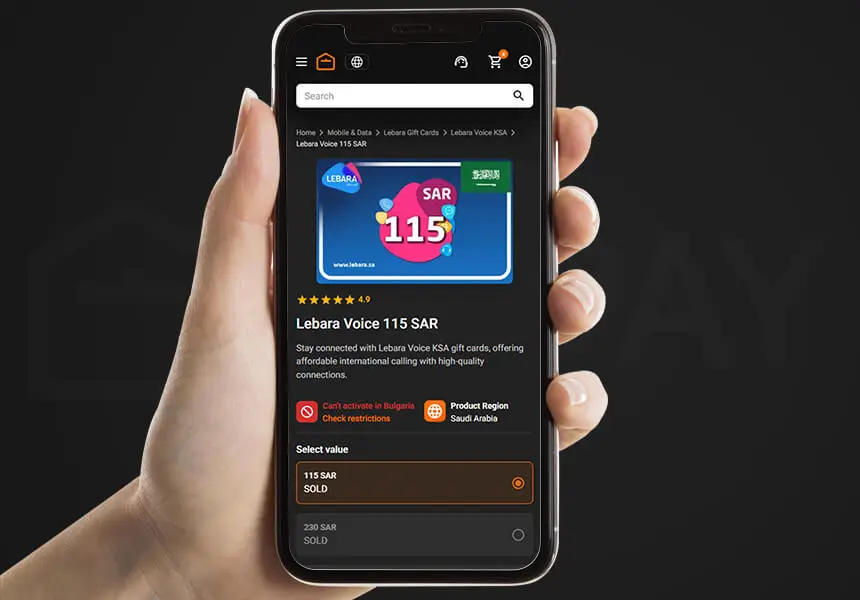
You can buy Lebara gift cards and recharge vouchers at:
- Supermarkets and hypermarkets like Panda, Danube, and Tamimi
- Online gift card platforms such as ARPAY or Noon
- Convenience stores and electronics outlets
Looking for a fast and secure way to recharge? Get your official Lebara gift cards now from ARPAY and enjoy instant delivery with no delays, trusted by users across Saudi Arabia.
Set Up Auto Recharge for Your Lebara Line in Saudi Arabia
If you’re tired of checking your balance every week or forgetting to recharge before your bundle ends, auto-recharge is your solution.
What Auto Recharge Means for Your Line
Auto recharge connects your chosen Lebara gift card to your account and automatically tops up your balance based on your selected amount and frequency.
How to Turn on Auto Recharge for Lebara KSA
To enable this feature:
- Open the Lebara app or go to the website
- Visit your payment settings
- Add a Mada, Visa, or MasterCard
- Select the amount and set the interval
- Confirm the setup
You can change or cancel these settings at any time.
Why Auto Recharge Helps Busy Users in Saudi Arabia
- No interruptions during important calls
- Your data and bundles renew on time
- No need to manually recharge each month
It’s ideal if you manage more than one line or want to avoid last-minute top-ups.
Edit or Cancel Auto Recharge Anytime
To manage your settings:
- Sign in to your Lebara account
- Head to the Auto Recharge section
- Select “Edit” or “Turn Off”
It’s flexible and completely under your control.
Read also: Top 10 Reasons to Use to Lebara Cards Today
Recharge Lebara Not Working? Fix It Fast
It’s rare, but sometimes recharges don’t go through. Don’t panic, these steps can usually sort it out.
Recharge Didn’t Show Up? What to Do
- Wait 5–10 minutes; it may be delayed
- Restart your device to reset the network
- Check for a recharge confirmation SMS
If there’s still no balance, go on to payment checks.
Check Your Card or Mada Wallet
- Ensure you have enough funds
- Some Mada cards must be enabled for online payments
- Call your bank if the transaction failed or was declined
Sometimes it’s just a small hiccup in the system.
How to Contact Lebara KSA Customer Service
When you need help:
- Use the live chat on the website or in the app
- Call 1755 from your Lebara SIM
- Message them via WhatsApp through their support link
Always keep your recharge time and transaction details ready.
Extra Tips to Recharge Lebara More Smartly
Beyond the usual top-up methods, there are a few tricks that make managing your balance smoother.
Send Balance to Other Lebara Users in Saudi Arabia
You can transfer credit between numbers:
- Dial 111mobile number*amount#
- Confirm the transaction
- Make sure both numbers are Lebara KSA lines
It’s useful when recharging for friends or family.
Recharge Lebara While Traveling Outside the Kingdom
Even if you’re overseas, your Lebara top-up options are still available:
- Use the app while connected to Wi-Fi
- Recharge Lebara through trusted platforms like ARPAY
- Ask someone in Saudi Arabia to recharge your number for you
Your Lebara SIM needs to be active before you leave the country.
Look for Recharge Offers and Lebara Discounts
Lebara often offers deals or extra credit when you recharge:
- Sign up for SMS notifications about new offers
- Watch for promotions on the app’s home screen
- Use platforms like ARPAY to find special discounts
A smart recharge can stretch your riyals further.
How to Manage Your Lebara KSA Account Easily
Managing your balance and plan settings helps you avoid surprises and keep track of your usage.
Check Your Lebara Balance: 3 Easy Ways
- Dial *000# for a quick balance update
- Open the app to see your current credit and data
- Log in online for a detailed overview
These tools keep you informed in real time.
Activate More Features in Your Account
Inside your account, you can:
- Add or switch bundles
- Monitor your usage
- Set alerts and view plan expiry
Everything is updated live, so you’re never left guessing.
Turn On Balance Alerts to Stay In Control
To avoid sudden disconnections:
- Enable push notifications in the app
- Turn on SMS alerts when your balance is low
- Recharge before your service is interrupted
Staying ahead of your balance helps avoid any hassle.
Read also: Borrow Credit From Lebara Saudi Arabia: 101 How to Guide
Conclusion
To wrap it up, staying connected shouldn’t come with stress or surprises, and with so many ways to recharge Lebara in Saudi Arabia, managing your mobile line has never been easier.
Whether you prefer topping up through the app, website, or using a recharge code, you have full control over your usage and spending. And if convenience is what you’re after, auto recharge and balance transfer options give you even more flexibility.
For those who want a secure and instant way to recharge or even send credit to loved ones, Lebara gift cards are the perfect choice. They’re quick, reliable, and make excellent gifts too.
Need to top up today? Head over to ARPAY and grab your Lebara gift card, fast delivery, great value, and no hassle. Stay connected, the smart way.

FAQs
Can I recharge Lebara with a credit or Mada card?
Yes. Both Mada and major credit/debit cards are accepted in KSA for all online and app-based recharges.
Does Lebara KSA charge fees when recharging?
There are no added fees when using official methods like the app, website, or approved retailers.
How long does a recharge take to apply?
Most recharges reflect within 1–2 minutes. If delayed, check your SMS or transaction receipt.
Can I recharge for my family or friends?
Yes, Lebara top-up for others is possible online or by using the 111 transfer code format.

Maggi
A content writer who specializes in the entertainment field, developing entertaining and interactive content that resonates with the culture of this field. I keep abreast of current trends, especially in the world of games, movies and shopping.

