


Google Play Points give Android users a practical way to earn rewards from everyday purchases on apps, games, movies, books, and more. Instead of spending without return, you collect points that can be redeemed for in-app items, discounts, or Google Play credit.
In this guide, you’ll learn exactly how the program works, the most effective methods to collect points faster, and how to maximize their value by strategically using Google Play gift cards alongside your regular purchases.
What Are Google Play Points and How Do They Work?
Google Play Points is a loyalty program that rewards users for spending money on the Google Play Store. Launched in select countries, it’s available to Android users who use a Google account and make eligible purchases. You can earn points by buying apps, games, in-app content, movies, books, and even subscriptions.
The system operates on a tiered model:
- Bronze (entry level)
- Silver
- Gold
- Platinum (highest tier)
Each tier offers increasing benefits such as bonus point events and higher point multipliers on purchases. For example, a Platinum member might earn 1.4 points per dollar spent, compared to just 1 point for Bronze users.
Once earned, these points can be used to:
- Redeem Play Store credit.
- Unlock exclusive in-game content.
- Get discounts on apps, games, or subscriptions.

How to Earn Google Play Points
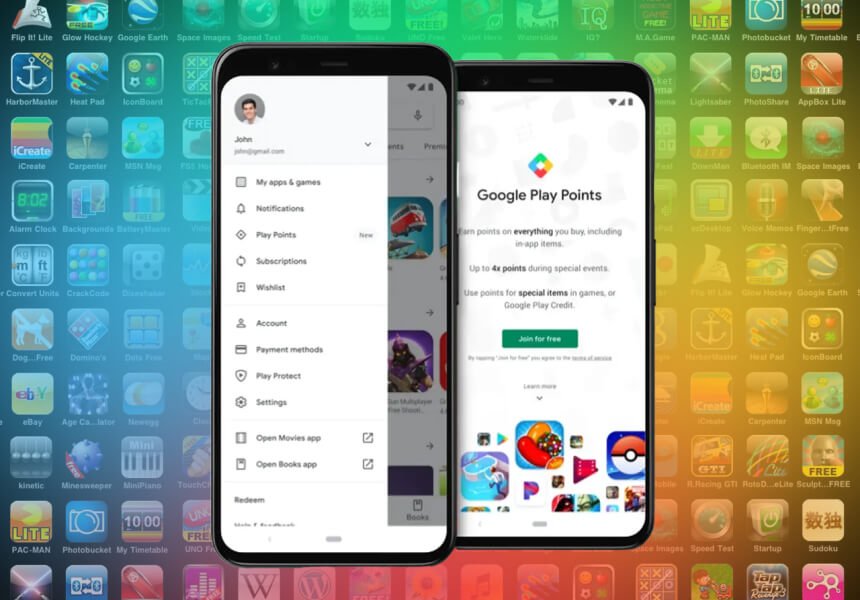
Earning Google Play Points is simple, and there are several ways to accumulate them without changing your regular spending habits.
1. Buy Apps and Games
Whenever you purchase a paid app or game from the Play Store, you automatically earn points. The more you spend, the more you earn, especially if you’re in a higher tier.
2. Make In-App Purchases or Subscriptions
Popular games like Clash of Clans, Mobile Legends, and PUBG Mobile often offer in-game items that qualify for points. Subscriptions to streaming apps or productivity tools also count.
3. Rent or Buy Movies, Books, and Audiobooks
Google Play Books and Movies are eligible for points. Each rental or purchase adds to your balance.
Discover the best 15 films on google play films from here.
4. Take Advantage of Limited-Time Promotions
Google regularly runs time-limited offers that give double or even triple points on select purchases. Watch for notifications or emails about these bonus periods.
How to Maximize Your Google Play Points
While earning points is easy, getting the most out of them requires a bit of strategy. Here are several ways to boost your balance and increase the value of your rewards:
1. Advance Through Tiers
Your account starts at Bronze, but the more you spend, the faster you move up to Silver, Gold, and eventually Platinum. Each tier brings benefits:
- Higher point multipliers.
- More frequent special offers.
- Access to exclusive rewards.
Aim to make consistent purchases using your balance to progress faster.
2. Monitor Weekly Boosts and Events
Google Play offers weekly “Boost” promotions that double or triple your earnings for specific apps or categories. Enabling Play Store notifications will help you stay informed and act quickly.
3. Use Points for High-Value Items
Instead of spending points on small perks, consider saving them for more valuable rewards like Play Store credit or premium app subscriptions. This increases your cost-per-point efficiency.
4. Subscribe to Play Pass or YouTube Premium
These subscriptions often come with bonus points and are eligible for partial redemption using your points. You can even pay for these using credit from gift cards.
5. Top Up with AR-Pay Gift Cards
By using ARPay’s Google Play gift cards, you can consistently make reward-eligible purchases, even if you don’t have a credit card. It’s also one of the fastest ways to earn points and keep your account active.
What Can You Redeem Google Play Points For?
Once you’ve collected enough Google Play Points, the next step is using them wisely. Google offers a wide variety of redemption options, giving you flexibility in how you spend your rewards.
1. In-App Items and Game Currency
Most users redeem their points for in-game purchases such as skins, weapons, or gems. in popular titles like Genshin Impact, Roblox, or Mobile Legends. These redemptions offer quick value and are often featured in seasonal offers.
2. Google Play Credit
You can convert your Play Points into Play Store balance. This allows you to purchase:
- Paid apps and games.
- Movies and books.
- App subscriptions.
This is one of the most flexible ways to spend your points.
3. Discounts on Google Services
In some countries, you can use points for discounts on services like YouTube Premium or Google One storage plans.
4. Exclusive Offers and Donations
Google occasionally allows users to redeem points for limited-edition items or to make charitable donations directly through the Play Store.
5. Extend Your Buying Power with Gift Cards
While you can’t directly redeem Play Points for gift cards, you can fund your purchases using AR-Pay’s Google Play gift cards. Combining gift cards and Play Points gives you more spending power and helps you get the best value from your purchases.
How AR-Pay Helps You Earn More Google Play Points
If you’re looking to earn Play Points consistently without linking your bank card or enabling auto-pay, AR-Pay’s offer a practical and reliable solution. Here’s how AR-Pay adds value to your Play Points strategy:
1. Instant, Secure Top-Up
AR-Pay provides immediate digital delivery of gift cards after purchase. You can redeem them directly in the Google Play Store and start earning points from eligible purchases right away.
2. No Need for a Credit or Debit Card
Not everyone wants to link a card to their Play Store account. With AR-Pay, you can fully fund your Google Play balance using prepaid cards, keeping your financial data private and secure.
3. Eligible for All Google Play Rewards
Purchases made using gift card credit are still eligible for Play Points. whether you’re buying apps, games, subscriptions, or content.
4. Available in Multiple Denominations
AR-Pay offers Google Play gift cards in various values, so you can choose what fits your budget while still earning Play Points efficiently.
5. Trusted by Users Worldwide
AR-Pay is a verified platform used by gamers, streamers, and app users in multiple countries. The service supports a wide range of local and international payment methods.
Is It Worth Using Google Play Points Regularly?
For many Android users, Google Play Points offer a valuable bonus on top of their usual spending. But is the program worth your attention in the long term?
Benefits of Google Play Points
- Free rewards on regular spending: Whether you’re buying a new app or subscribing to YouTube Premium, earning points costs you nothing extra.
- Access to exclusive content: Many games offer exclusive items or bundles only available through Play Points.
- Redeemable credit: Turning points into Google Play balance gives you the flexibility to buy what you want.
- Tiered rewards system: Higher tiers come with more benefits, including frequent bonus events and better earning rates.
Limitations to Keep in Mind
- Limited availability: Not all countries support the Play Points program.
- Expiration policy: Points expire after one year if unused.
- Some rewards are region-specific: Certain offers or redemptions may not be available in your country.
Best Practice: Use Points + Gift Cards Together
The most efficient way to benefit is by using Google Play gift cards to make purchases, especially during promotional events that offer bonus points. This method ensures that you:
- Stay in control of your spending
- Continue earning Play Points regularly
- Avoid using personal financial information online
Learn more from here: Earn Google Play Points: Unlock Paid Apps with These 6 Tips
Conclusion
Google Play Points are a simple way to get more out of your Play Store spending. But to earn consistently and securely, pairing your purchases with AR-Pay’s Google Play gift cards is the smartest move.
Buy your Google Play gift card now on AR-Pay and start collecting points today.

FAQs
What is Google Play Points and where is it available?
Google Play Points is a loyalty program where users earn points for purchases. Like apps, games, in-app items, movies, books, and subscriptions. It’s available in over 30 countries including the US, UK and India. check within your Play Store settings under “Play Points.”
How do I join the program?
Open the Play Store app and tap your profile → Play Points → Join.
Alternatively, on the desktop, visit the Play Points section and click Join.
You must use a personal Google account, reside in a supported country, and add a valid payment method.
How quickly can I start earning points?
Points begin accruing immediately after enrollment. You earn 1 point per $1 spent at Bronze level. higher tiers boost rates (e.g., Gold at 1.2 points, Platinum at 1.4)
What types of purchases qualify for earning points?
- Paid apps or games
- In-app/in-game purchases
- Subscriptions (e.g. YouTube Premium, Google One)
- Movies, books, audiobooks
- Featured “try-to-earn” offers, first-time installs, and weekly bonuses
Why didn’t I receive points for a purchase?
Possible reasons include:
- You joined after making the purchase (only future purchases count).
- You used a different Google account.
- Points may take time (especially for in-app content)
- Device date/time or Play Store version problems
Can I redeem points for cash or gift cards?
No, points cannot be converted to cash and cannot be transferred. However, you can redeem them for Google Play credit, in-app items, coupons, partner offers, charitable donations, or even Google merch (in supported regions)
Do Google Play Points expire?
Yes, points expire 12 months after the last activity (earning or redemption). Your membership level resets annually based on accumulated points from the previous year.
What tiers exist and what perks do they offer?
The program has Bronze, Silver, Gold, and Platinum levels. Higher levels earn more points per dollar and unlock perks like exclusive weekly rewards and monthly promotions
Can I earn points without a credit/debit card?
Yes. Simply purchase Google Play gift cards from AR‑Pay and redeem them on your account. Any purchase using that balance still earns points, just like a regular payment method.
How can AR‑Pay Google Play gift cards enhance my experience?
- Instantly fund your Play balance without linking cards
- Continue earning Play Points on all purchases
- Great for budgeting or gifting
- Work consistently across apps and content

Hager Hesham
Content Writer and your go-to gaming expert. I'm here to share my best practices, valuable strategies, and professional gamer guidance. Also, I'm a gem hunter for the best deals and gift cards, just to enjoy games at almost zero cost with AR-pay.

