STC Pay is a digital financial platform that has helped reshape how people handle everyday transactions in the Middle East. As part of Saudi Telecom Company’s broader ecosystem, STC Pay is presented as a secure way to manage payments, transfers, and wallet activity through a mobile app—so you can pay, send, and track money without bouncing between multiple services. Specific features, pricing, and availability can change over time, so this 2026 refresh keeps the original structure while flagging anything that should be confirmed inside the app before you rely on it.
One note from the original version: it included a product CTA for STC Sawa gift cards. Instead of pushing one brand-specific card, this update focuses on how to use STC Pay safely and effectively—then gives you one simple place to shop telecom credit when you need to top up.
Benefits of Using STC Pay

STC Pay is positioned as a wallet-style app built for speed and convenience. The original article highlights a set of benefits—remittance, bank transfers, QR payments, bill payments, mobile recharge, analytics, and marketplace access. In 2026, these benefits are still a helpful way to think about the app, but the details behind them (fees, limits, supported corridors, and partner networks) can shift. Use the list below as a map of what to look for in your own STC Pay account.
- International remittance: The source claims you can send money internationally and instantly via mobile to a very large Western Union network, with competitive prices and refund options. Treat “instant,” pricing, refunds, and destination availability as dynamic—confirm the corridor, fees, and payout method in-app before sending.
- Local bank transfers: The source says transfers to Saudi bank accounts can be done easily, including during holidays, for a nominal fee. Fees, processing times, and holiday behavior can change—verify transfer availability and charges at the moment you send.
- Wallet-to-wallet transfers: Send money between STC Pay wallets for quick peer-to-peer payments. Limits and verification requirements may apply.
- QR code payments: Pay at participating merchants by scanning a QR code. Merchant coverage varies, so treat “wide range of shops” as location-dependent.
- Bill payments and mobile recharge: The app may support paying bills and recharging prepaid mobile lines. Eligible billers and telecom products can change, so confirm in-app.
- Financial management: Spend analytics can help you understand patterns across weeks and months—useful if you want tighter budgeting and fewer surprise outflows.
- Marketplace access: The original article mentions a marketplace connecting users to products and services. Marketplace content can rotate, so consider it a bonus rather than a guaranteed feature set.
Practical 2026 tip: if you’re using STC Pay for anything time-sensitive (rent deadlines, family remittances, urgent mobile top-ups), do a small “test” transaction first. It helps you confirm the fees, the speed, and the exact workflow for your account type.
How To Use STC Pay
Using STC Pay is usually straightforward, but your exact steps can depend on onboarding rules, verification requirements, and which features are available for your account. The original guide suggests this step-by-step flow (refreshed for 2026):
- Download the app: Install STC Pay from your device’s app store.
- Create an account: Sign up and complete any required verification steps before attempting transfers. Requirements can change.
- Add money to your wallet: The source lists Apple Pay, bank transfer, SADAD, or adding a credit/debit card. Available top-up rails can differ by user type and time, so follow what your app shows.
- Make payments: Use the Pay option for QR payments or merchant payments, when supported.
- Transfer funds: Choose wallet-to-wallet for friends/family, or bank transfers for accounts. Always confirm recipient details before sending.
- International remittance: Use the remittance section, then confirm exchange rate, total fees, payout method, and ETA before submitting.
- Bills and mobile recharge: If your account supports it, pay bills and recharge eligible mobile lines directly in-app.
- Digital card and withdrawals: The source mentions creating a digital Visa card and paying an annual fee, plus withdrawing cash at compatible ATMs. Fees, eligibility, and ATM compatibility can change, so verify inside your Cards and Cash Withdrawal sections.
Security habits that matter in 2026: enable app lock/biometrics, don’t share OTP codes, and keep your notifications on for transfers so you can spot unfamiliar activity immediately. If you’re using QR payments, always check the merchant name and amount on-screen before confirming.
What Are The Banks That Deal With STC Pay?
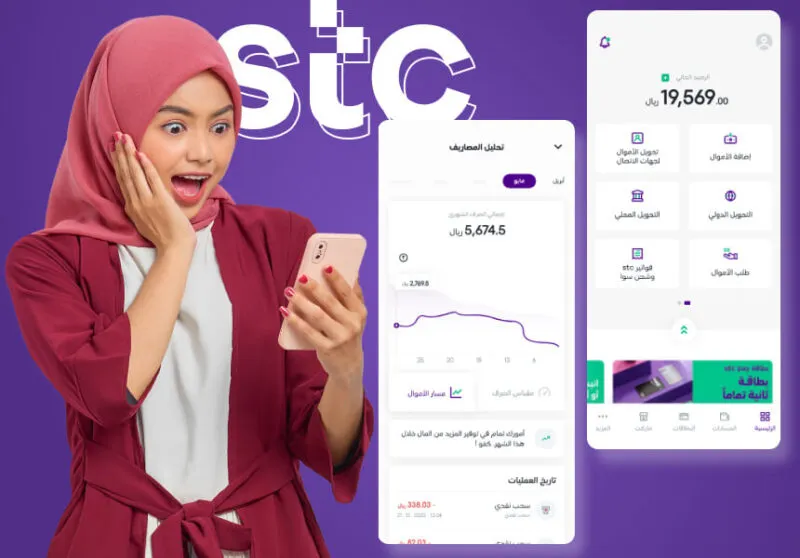
The original article states STC Pay partnered with several banks to facilitate local transfers in Saudi Arabia, then lists specific names (Riyad Bank, Alinma Bank (ANB), Samba Financial Group, Banque Saudi Fransi, Alawwal Bank, and SABB). Partnerships and bank naming can change due to product updates or mergers, so confirm the current supported bank transfer options directly inside the Transfer/Bank section of your STC Pay app.
A useful rule of thumb: even if a bank is supported, transfer speed can differ by method (wallet-to-wallet vs bank transfer) and by whether you’re sending during business hours. If timing matters, run a small test transfer first.
Conclusion
In 2026, STC Pay still reads as an all-in-one wallet for payments, transfers, bill settlement, and mobile-related activity—built around a simple idea: do more from one app, with clear confirmations and better visibility into where your money goes. The smartest way to use it “like a pro” is to verify fees and limits before you send, confirm recipient details every time, and keep security controls turned on. Because fintech products evolve quickly, treat any fixed claims about pricing, “instant” transfers, specific partner banks, and card fees as items to confirm in-app before you depend on them.