Quick action: if this PUBG update leads to a top-up or gift-card purchase, start on AR-PAY
Version 4.3 is shaping up to be one of the most ambitious updates in the game’s history. We’re not talking about a fresh coat of paint or a seasonal weapon swap. Pubg Mobile new update 4.3 release date introduces a brand-new strategic layer through a Passive Skill Specialization System, reworks four of Erangel’s most iconic locations, drops a mounted machine gun vehicle into the game, and celebrates the 8th Anniversary with a full-blown themed mode called the Evolving Universe.
Here’s everything confirmed about the PUBG Mobile 4.3 update, broken down clearly so you can hit the ground running on day one.
PUBG Mobile 4.3 Update Release Date: When Does It Drop?
Let’s get the most important question out of the way first.
Global Rollout Schedule
- PUBG Mobile KR / JP: March 10, 2026
- PUBG Mobile Global / VN: March 11, 2026
- BGMI (India): March 16, 2026
- New Season (C8S22 / A18 Royal Pass): March 13–15, 2026
The update follows Level Infinite’s standard phased rollout approach, so don’t be surprised if you see it appear on your device slightly earlier or later depending on your region and device type.
Where to Download
- Google Play Store: Available at rollout for Android users
- Apple App Store: Available at rollout for iOS users
- Official APK: Published on the PUBG Mobile website on launch day for sideload installs
Important for Beta Testers: If you’ve been testing 4.3 features in the beta build, your progress does NOT carry over to the stable global release. Match stats, UC purchases, and tier rankings will all reset the moment the official version goes live. Don’t let that catch you off guard.
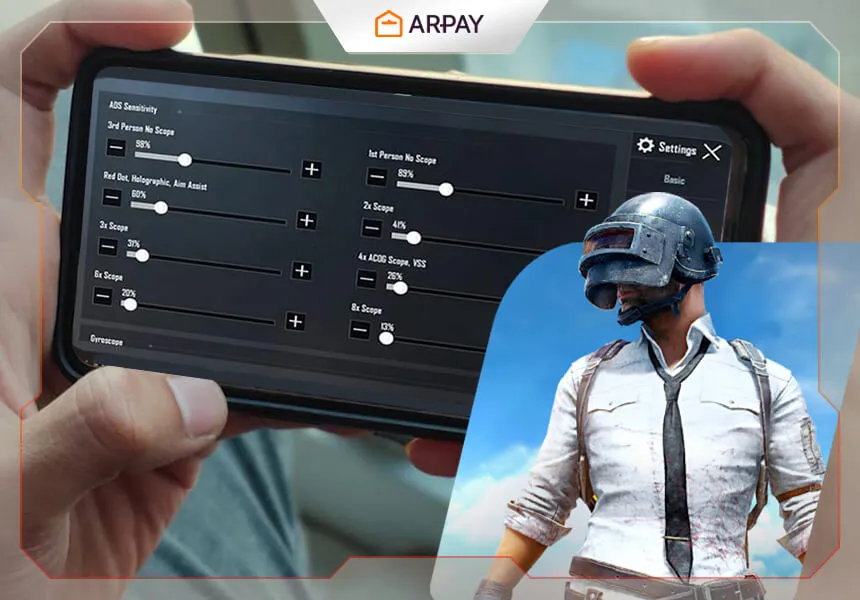
Read More: PUBG Mobile 2026: Fix Recoil, Aim & ADS Fast on Any Device!
PUBG Mobile 4.3’s Game-Changing Feature: The Passive Skill Specialization System

This is the headline feature of the entire update, and for good reason.
For the first time in PUBG Mobile’s history, players can choose a specialized tactical role before entering a match. The Specialization System adds a layer of strategic depth that goes beyond just choosing your landing spot or weapon loadout. It fundamentally changes how you approach the game from the very first second.
All 5 Specializations: Full Breakdown
SpecializationCore AbilityBest Playstyle FitHealingFaster revive speed + health restoration to the user after a successful rescueSupport / Squad anchorDetectionTemporarily marks enemies on the map and HUD after dealing damage to themIntel-driven / TacticalCombatGrants a short movement speed burst after knocking or eliminating an enemyAggressive fragger / EntryPerceptionWhile prone, emits a chem signal that detects nearby enemies and vehicles through wallsRecon / StealthVehicleReduces vehicle fuel consumption and damage taken; unlocks unique vehicle upgrade optionsDriver / Rotation specialist
How the Specialization System Works
- Select your specialization on Spawn Island before the match begins
- Each specialization comes with unique passive abilities tied to a specific playstyle
- Skills start at Rank C and can be upgraded all the way to Rank S during the match
- Upgrading your rank enhances the strength and impact of your chosen abilities
All 5 Specializations: Full Breakdown
- Healing Core Ability: Faster revive speed + health restoration to the user after a successful rescue. Best Playstyle Fit: Support / Squad anchor
- Detection Core Ability: Temporarily marks enemies on the map and HUD after dealing damage to them. Best Playstyle Fit: Intel-driven / Tactical
- Combat Core Ability: Grants a short movement speed burst after knocking or eliminating an enemy. Best Playstyle Fit: Aggressive fragger / Entry
- Perception Core Ability: While prone, emits a chem signal that detects nearby enemies and vehicles through walls. Best Playstyle Fit: Recon / Stealth
- Vehicle Core Ability: Reduces vehicle fuel consumption and damage taken; unlocks unique vehicle upgrade options. Best Playstyle Fit: Driver / Rotation specialist
Expert Take: Why This Changes Everything
The Perception specialization is going to be the most debated pick in the competitive community. The ability to detect enemies and vehicles through walls while prone completely reshapes how information is gathered in the final circles. Late-game meta will never be quite the same.
Detection is a sleeper pick that high-level squads will abuse heavily. The moment you deal damage to an enemy and they light up on your HUD, your entire squad gains a targeting advantage that compounds with good communication.
For casual and mid-tier players, Healing is the safest pick. The revive speed boost alone can turn a 1v4 clutch situation into a winnable fight.
The bottom line: squads that coordinate their specialization picks will have a significant edge over squads that don’t.
Erangel Reworked: New Hot Drop Zones in the PUBG Mobile 4.3 Update

Erangel has always been the soul of PUBG Mobile. In version 4.3, four of its most iconic locations have been reimagined with unique mechanics, loot incentives, and interactive elements that make dropping there a completely different experience.
Pochinki: Now the Music District
Pochinki has always been the most contested drop on Erangel. In 4.3, it becomes the Music District, and the new mechanics tie directly into audio gameplay.
What’s new at Pochinki:
- A Livehouse with a DJ booth sits at the center of the zone
- Interacting with the DJ booth grants Level 3 loot and airdrop-tier weapons instantly
- Slide rails allow players to travel between rooftops rapidly for fast flanks and repositions
- Dynamic environmental music changes the audio rules of the zone:
During high-decibel phases, footstep sounds are dampened, enabling completely silent rushes - During low-decibel phases, all audio is amplified, making every step, crouch, or prone movement detectable
Strategic implication: Audio timing is now a core skill at Pochinki. Knowing when to push and when to hold based on the music phase will separate good players from great ones. The DJ booth is going to be fought over hard. Expect it to be the most contested point on the entire map at drop.
Hospital: Aerodynamic Sports Zone
The Hospital gets a full thematic overhaul into an Aerodynamic Sports Zone that rewards aggressive, mobile players.
What’s new at Hospital:
- Fall damage is completely disabled within the zone
- A Cannon Launcher allows players to blast themselves toward a bullseye target for high-tier loot rewards
- Players receive a yellow recall effect and automatic health boosts within the zone
- High mobility combined with zero fall damage makes this one of the safest high-reward drops in the game
Strategic implication: The Hospital is now the best zone on Erangel for aggressive early-game loot fishing at minimal risk. The Cannon Launcher creates a high-skill, high-reward interaction. Nail the bullseye, grab premium loot, and skip the ground floor fight entirely.
Mylta: Racing Zone
Mylta transforms into a full racetrack in 4.3, adding a competitive mini-game element to what was previously one of the quieter corners of the map.
What’s new at Mylta:
- The entire zone is converted into a functional racetrack layout
- Players can participate in mini-races against each other for in-match rewards
- Completing races rewards Vehicle Specialization EXP and quality loot
- Natural synergy with the Vehicle specialization pick
Strategic implication: If you’re running the Vehicle specialization, Mylta is your priority drop. Stacking Vehicle EXP early from races means you hit higher rank tiers faster than anyone else in the lobby. With the vehicle buffs that unlocks, mid-game rotations become a serious power play.
Mansion: The Restaurant Zone
The Mansion takes on a unique restaurant-themed identity and comes with one of the most interesting defensive tools in the update.
What’s new at Mansion:
- A full restaurant-themed layout replaces the standard interior
- A “Kamehameha” button (a nod to past PUBG Mobile collaborations) can be activated to generate a temporary protective shield
- Functions as a strong defensive anchor point for mid-game rotations
Strategic implication: The Mansion’s shield mechanic makes it an excellent mid-game staging area for squads waiting to rotate into the final circles. Squads that control the Mansion in mid-game hold a defensive advantage that’s hard to break without heavy aggression.
New Weapons, Gear & Vehicles in PUBG Mobile 4.3 Update
Armored BRDM with Machine Gun

The BRDM-2 has always been a powerful tool for crossing open ground. In version 4.3, it becomes something much more dangerous.
Key details:
- Summoned via a new Armored Flare Gun, a separate item from the standard Flare Gun
- Equipped with a mounted .50 caliber machine gun on the exterior
- Passengers can operate the machine gun while the vehicle is in motion
- Provides suppressive fire capability that no previous vehicle in PUBG Mobile has matched
Expert Take: This turns the BRDM from a pure survival tool into a mobile gun platform. Squads with strong communication will rotate into endgame while simultaneously suppressing enemy positions. Expect this to dominate open-field final circles at every skill level.
Energy Shield
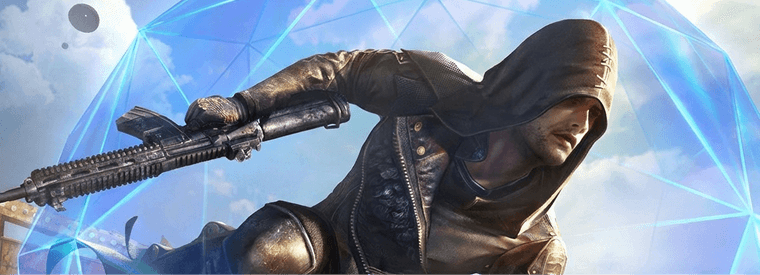
One of the most tactically interesting additions to the game in years.
Key details:
- A deployable hemispherical barrier that can be placed anywhere in the environment
- Lasts 15 seconds from deployment
- Blocks all bullets and throwables, providing full protection from every direction
- Players inside the shield cannot shoot outward while it is active
Best use cases for the Energy Shield:
- Reviving a downed teammate in an exposed open area
- Buying time during a heal sequence under heavy pressure
- Creating a temporary objective-control barrier in final circles
- Baiting enemies into rushing while you reposition behind cover
Floating Thruster (Vehicle Attachment)
A new attachment type that raises the ceiling on vehicle mobility.
Key details:
- Found as loot in the field or purchasable at gas stations across the map
- Attaches to your vehicle to provide 6 seconds of Nitro-level acceleration
- Functions as a burst-speed boost rather than a sustained upgrade
Expert Take: Six seconds of full nitro is a significant window. Whether you’re escaping a shrinking zone or pulling a surprise reposition in the endgame, the Floating Thruster adds a clutch tool to the Vehicle specialization’s already strong toolkit.
Tactical Drone
A new drone item is confirmed for the 4.3 update.
Key details:
- Requires a specific activation item to deploy, not a standard pickup
- Full ability details are still emerging from beta builds
- Expected to offer reconnaissance or targeting utility based on early footage
Watch official PUBG Mobile channels for full Tactical Drone details closer to the March release.
Weapon Balancing Changes
Beyond the new additions, the 4.3 update recalibrates existing weapons across the board.
Assault Rifles:
- Reduced horizontal spread at medium ranges, rewarding controlled bursts over full-auto spray
DMRs (Designated Marksman Rifles):
- Improved first-shot accuracy for more reliable performance at distance
- Slightly slower follow-up shot recovery, rewarding patient and deliberate trigger control
Damage Falloff:
- Recalibrated specifically for 120m–150m engagements, the mid-to-long range band where most competitive fights happen
Metro Royale Season 24: What’s New in PUBG Mobile 4.3

Metro Royale gets a full seasonal refresh alongside the main update.
Season 24 Highlights
- New high-tier gear and weapons added to Metro Royale’s exclusive loot pool
- Season 24 Battle Pass includes exclusive outfits, weapon skins, and crafting materials for gear upgrades
- Seasonal progression and Metro Royale inventory carry over within the mode, separate from standard Battle Royale rank
Reminder: Metro Royale progress operates independently from the main Battle Royale mode. Your Metro Royale gear, currency, and season progress are unaffected by the 4.3 rank reset.
QoL Updates & System Improvements in Pubg 4.3 Update Version
The 4.3 update isn’t just about flashy new content. Several quality-of-life improvements address long-standing pain points that the competitive community has flagged for years.
Audio Overhaul: Vertical Audio Recalibrated
- Vertical audio accuracy has been significantly improved for multi-story building engagements
- Players should now more reliably identify whether enemy footsteps are above or below them
- Directly impacts gameplay in Pochinki, School, and any urban area with multiple floors
Expert Take: This is the most impactful QoL change in the entire update for competitive players. If the vertical audio fix performs as described, it changes how you track enemies in every building fight. This has been a top complaint for years, and fixing it is long overdue.
Visual Damage Indicators: Color-Coded by Distance
Directional damage markers now change color based on incoming fire distance:
- Red = close-range threat
- Orange = long-range threat
- Provides instant information about the nature of incoming fire without needing to analyze sound
Minimap Improvements
- Improved icons across the minimap interface
- Clearer terrain rendering for better spatial awareness during rotations
Don’t miss out on exploring PUBG Mobile Gift Card Discounts on AR-PAY – Get More for Less
PUBG Mobile’s 8th Anniversary Event: Evolving Universe Mode
The 4.3 update also marks PUBG Mobile’s 8th Anniversary, and the celebration is built directly into the core of the update with a full themed mode.
What Is the Evolving Universe Mode in PUBG Mobile’s Update?
- A Time-Space Vortex appears over Erangel as the central visual and thematic element
- The mode is expected to replace Skyhigh Spectacle for the season
- All four reworked hot drop zones (Pochinki, Hospital, Mylta, Mansion) are connected to the anniversary theme
- Limited-time cosmetics, anniversary rewards, and event-specific missions are expected to accompany the mode
What to Expect from Anniversary Rewards
While the full reward list hasn’t been officially published, PUBG Mobile’s anniversary events historically include:
- Daily login rewards with UC, coupons, and exclusive emotes
- Limited-time cosmetics tied specifically to the anniversary theme
- Event missions with milestone rewards for active players
- Exclusive skins not available through the standard Royal Pass
Tip: Log in every day during the anniversary window. PUBG Mobile’s celebration events consistently offer some of the best free cosmetic value of the entire year. Missing daily logins means missing permanently limited items.
How to Download PUBG Mobile 4.3: What Beta Testers Must Know
- Android: Available on the Google Play Store at rollout. Update prompts will appear automatically if auto-update is enabled
- iOS: Available on the Apple App Store at rollout
- APK (Manual install): The official APK link is updated on the PUBG Mobile website on launch day. Use only the official source
Critical Notice for Beta Testers
If you’re currently running the 4.3 Beta build, here’s what you need to know before the stable version releases:
- Match stats will reset. Beta results do not count toward any official records
- UC purchases in beta do not carry over. Do not spend real money in the beta environment expecting to keep it
- Tier rankings reset. Your beta rank has no impact on your stable release placement
- All beta-exclusive progress is wiped the moment the official stable version launches in March
To Add UC using PUBG gift cards you need to follow the 4 steps ARPAY Guide to redeem PUBG Gift Cards.
Conclusion
The Passive Skill Specialization System alone makes this a landmark update. Combined with the Erangel hot drop reworks, the vertical audio fix, and the 8th Anniversary Evolving Universe mode, version 4.3 delivers across every area of the game.
Mark March 10-11 on your calendar as Pubg 4.3 update release date, coordinate your specialization picks with your squad, and plan your Erangel landing accordingly.
Stock up on UC before the update drops. Get your PUBG Mobile gift card from ARPAY and be ready to unlock the best 8th Anniversary rewards, Royal Pass, and exclusive skins on day one.
FAQs
When is the PUBG PUBG Mobile 4.3 release date official?
The global version of PUBG Mobile 4.3 is expected to release on March 11, 2026, with the KR/JP version arriving March 10. BGMI (India) follows around March 16.
What are the new passive skills in 4.3 Update Pubg?
There are five specializations: Healing, Detection, Combat, Perception, and Vehicle. Each is selected before the match and can be upgraded from Rank C to Rank S during the game.
What are the Erangel changes in PUBG Mobile 4.3?
Four locations have been reworked: Pochinki (Music District), Hospital (Aerodynamic Sports), Mylta (Racing Zone), and Mansion (Restaurant Zone). Each features unique interactive mechanics and loot incentives.
Will beta tester progress carry over to the PUBG 4.3 stable release?
No. All beta progress, including match stats, UC purchases, and tier rankings, resets completely when the official stable version launches in March 2026.
What new weapons are coming in PUBG Mobile 4.3?
The update adds the Armored BRDM with a mounted machine gun (via Armored Flare Gun), the Energy Shield deployable barrier, the Floating Thruster vehicle attachment, and the Tactical Drone.
Use this method on AR-PAY
Keep the guide for the gameplay decision, then use AR-PAY when you’re ready to buy.
Visit AR-PAY or use the related PUBG links above.