Twitch gift cards are a simple way to add balance to your Twitch account so you can support creators and unlock platform features without using a bank card every time. Whether you’re a dedicated viewer, a streamer building a channel, or just buying a practical gift, the redemption flow is quick—but small mistakes (wrong region, mistyped code, or sketchy sellers) can turn it into a headache.
This is a 2026 refresh of the original guide. The core steps are stable, but policies can change (regional eligibility, what balance can be spent on, and whether cards expire), so any policy-like statement should be verified against Twitch’s current help pages before publishing as definitive. []
How to redeem a Twitch gift card
You can redeem a Twitch gift card from home in a couple of minutes. Before you start, make sure you have a valid Twitch account and that you’re signed in to the account you actually want to fund (it’s easy to redeem while logged into the wrong profile). []
- Visit twitch.tv/redeem.
- Enter the gift code exactly as shown (watch for 0 vs O and 1 vs I).
- Redeem and confirm the balance applies to your account; if prompted, select your country/region carefully. []
If you’re redeeming during checkout (for example, when buying a subscription or Bits), you may see an option like “Redeem” or “Redeem code” during the payment step. The wording can vary by platform (web vs. app) and by region, so follow the on-screen prompts and double-check the account name before you finalize. []
Redeeming Twitch gift cards internationally
The original article says Twitch gift cards can be redeemed from anywhere, but also warns about region restrictions. In practice, “internationally” usually means you can attempt redemption from any location, but the card itself may be limited to certain regions or currencies. Confirm your card’s region rules before you gift it across borders. []
- Sign in to your Twitch account: Use the website or app and verify you’re on the correct account.
- Open the redemption flow: Use twitch.tv/redeem, or find “Redeem a Gift Card” in account settings if your app surfaces it. Menu labels can change. []
- Enter the code carefully: For physical cards, scratch gently to reveal the full code without damaging characters.
- Confirm and apply: If the code is valid, your balance should update. If it doesn’t, treat it as a region mismatch or already-used-code possibility and troubleshoot. []
If you’re traveling, a common pitfall is redeeming while your account region or payment country settings don’t match the card’s region. Another pitfall is assuming a card bought in one country will work in another without restrictions. When in doubt, save the code and redeem from the account’s home region (or contact Twitch support with purchase proof). []
Security measures for Twitch gift card redemption
Gift card codes should be treated like cash. If someone gets your code first, you usually won’t be able to “take it back,” and scammers often target gift cards because they’re fast to steal and hard to trace.
- Keep your code confidential: Don’t share it in chat, screenshots, or “support” DMs.
- Buy from reputable sources: Avoid deals that look unrealistically cheap; that’s where stolen or already-used codes often appear. []
- Monitor your account: If you notice balance changes or purchases you didn’t make, report them quickly. []
- Use secure connections: Redeem on a trusted network and avoid public Wi‑Fi when entering codes.
Benefits of using Twitch gift cards
Twitch gift cards are popular because they’re flexible and easy to gift. The source highlights several benefits—here’s how to think about them in 2026 without overpromising features that might differ by region or policy.
Versatile spending options
The source says Twitch gift cards can be used for things like subscriptions, Bits, and possibly other Twitch purchases. Exact eligible purchases can differ by region and policy, so confirm what balance can be spent on before publishing a definitive list. []
No expiration date
The source claims Twitch gift cards do not have an expiration date. Confirm current terms for your region and card type in 2026, since gift card terms can vary and can change. []
Ideal for gifting
Gift cards work well when you want to support someone’s hobby without guessing a specific subscription tier or purchase. They’re especially handy for viewers who like to rotate which creators they support month to month.
Enhanced streaming experience
With balance available, it’s easier to subscribe, cheer, or support creators without interrupting a stream to handle payment steps. What you can buy with balance can vary, so confirm current rules for 2026. []
Popular Twitch gift card denominations
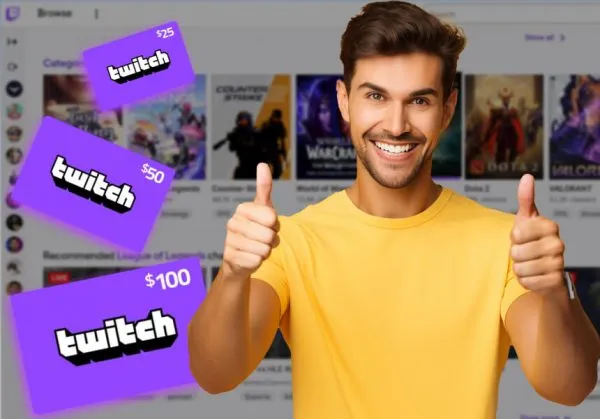
The original article lists common denominations. In 2026, availability depends on retailer and region, so treat the list below as “commonly seen” and confirm what’s actually sold where you operate. []
- $10 gift card: A starter amount for a small purchase or a first test of Twitch balance. []
- $25 gift card: More flexibility for subscriptions or a larger balance-based purchase. []
- $50 gift card: A solid choice for regular Twitch users or gifting with room to choose how to spend. []
- $100 gift card: A higher-value gift intended for longer-term use; verify what it can cover under current Twitch pricing. []
Conclusion
Twitch gift cards are a convenient way to fund your Twitch account, support creators, and simplify stream-time purchases. The redemption flow is straightforward: sign in, open twitch.tv/redeem, enter the code, and confirm the balance applies. In 2026, the main things to double-check before you publish this guide as “final” are region eligibility, what balance can be spent on, and whether any policy details (like expiration) differ by card type. []