


You’ve got a PlayStation gift card, or you’re thinking of buying one. Seems simple enough, right? But did you know there are ways to stretch that card further than you might think?
- How PlayStation Gift Cards Work and Why You Need Them
- How to Redeem a PlayStation Gift Card Quickly and Safely
- What You Can Buy with a PlayStation Gift Card
- Fixing PlayStation Gift Card Code Errors and Problems
- Gift Cards and Child Accounts on PlayStation: Problems and Fixes
- Smart Ways to Use Your PlayStation Gift Card Balance
- Important Rules for Using PlayStation Gift Cards
- Conclusion
- FAQs
It doesn’t matter if you are a long-time PS4 user or just set up your PS5, since knowing exactly how these cards work can help you unlock more content, avoid common mistakes, and grab better deals.
This guide answers real questions, skips the fluff, and shows you how to make the most of every credit.
How PlayStation Gift Cards Work and Why You Need Them

What Is a PlayStation Gift Card Used For?
A PlayStation gift card is a prepaid digital card that adds credit to your PlayStation Network (PSN) wallet. You can use this balance to:
- Buy full games and indie titles
- Download expansions and in-game items
- Subscribe to PlayStation Plus
- Rent or purchase movies
- Purchase avatars, themes, and other digital content
It’s a safe and flexible way to shop on the PlayStation Store without linking a credit card. These cards are also great for gifting since they offer the recipient full control over how to spend them.
Different Types of PlayStation Gift Cards and What They Do
Here are the main types of PlayStation gift cards and how each is used:
- PlayStation Store Cards: Add wallet funds to buy games, content, or subscriptions.
- PlayStation Plus Membership Cards: Activate or extend PlayStation Plus (Essential, Extra, Premium).
- Special Content Cards: Some cards are game-specific (e.g., Call of Duty Points).
Each serves a distinct purpose. Store cards offer general spending freedom, while membership cards are for users focused on online play and cloud saves.
Why Choose ARPAY to Buy PlayStation Gift Cards Online?
ARPAY offers instant digital delivery, secure payments, and clear regional labeling on every PlayStation gift card, so you always know exactly what you’re getting. No delays, no surprises.
Buy your PlayStation gift card from ARPAY today and get playing without the wait.
Tip 1: Avoid third-party sellers without a trusted reputation. Counterfeit or used codes are common
Tip 2: Always make sure to purchase a PlayStation gift card that matches your account’s region (UAE PlayStation gift card, UK PlayStation gift card, or US PlayStation gift card, etc) to avoid issues with redemption or invalid codes.
When you buy from ARPAY, every card is clearly labeled by region, making it easy to choose the right one without second-guessing issues from unofficial vendors.

How to Redeem a PlayStation Gift Card Quickly and Safely
How to Redeem a PlayStation Gift Card on the Website
To redeem via browser:
- Visit store.playstation.com.
- Log in to your PSN account.
- Click your profile icon, then select Redeem Code.
- Enter your 12-digit code carefully.
- Confirm, and your wallet updates instantly.
How to Use a PlayStation Gift Card on the App
Redeem on mobile with these steps:
- Open the PlayStation App.
- Go to your account from the bottom menu.
- Tap Redeem Code.
- Enter the 12-digit code or scan it using your phone’s camera.
- Tap Continue and your funds will be available immediately.
How to Enter a PlayStation Gift Card on PS4 or PS5
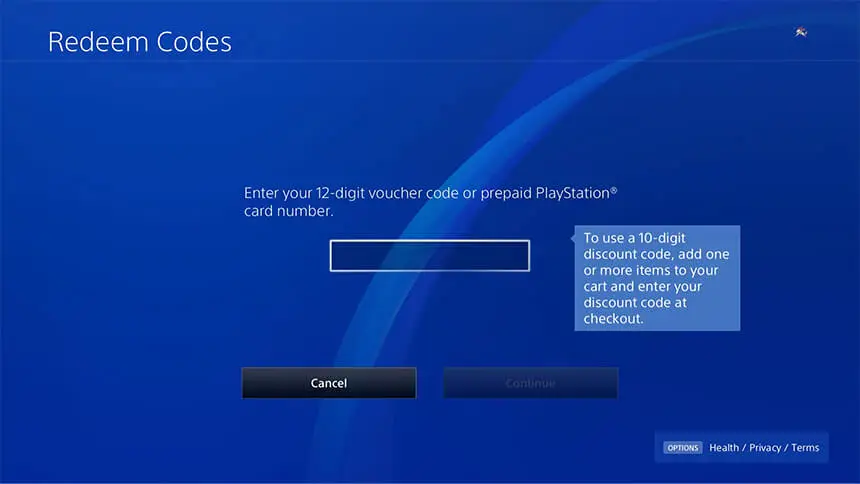
Use your console directly:
- Navigate to: Settings > Users and Accounts > Account > Payment and Subscriptions > Redeem Codes.
- Enter the code as displayed.
- Confirm, and the balance will be added to your wallet.
You can also access this option directly from the PlayStation Store homepage under the “More” menu.
Read also: PlayStation Store UAE: Explore Best Games & Hot Deals
What You Can Buy with a PlayStation Gift Card
Add Gift Card Balance to Your PS Wallet
After redemption, funds are automatically transferred to your PSN wallet. To view your balance:
- On console: Go to Settings > Account > Wallet
- On app: Tap on Payment Settings under your profile
- On browser: Check Wallet under your account profile
What Can I Buy with a PlayStation Gift Card?
Your wallet funds can be used for:
- Digital game purchases (new releases or classics)
- Pre-orders
- DLC and in-game currency
- PlayStation Plus subscriptions
- Themes, avatars, and movies
There’s no restriction, so the entire catalog is open for purchase.
Pay with a Gift Card and Another Payment Method
If your wallet doesn’t have enough credit:
- Begin the checkout process
- Use your gift card balance first
- Add the remainder using:
- Credit or debit card
- PayPal
- Mobile payment options (region-dependent)
This combined payment method is helpful when items exceed your card’s value.
Fixing PlayStation Gift Card Code Errors and Problems
PlayStation Gift Card Code Not Working: What to Do
If you get an invalid code message:
- Double-check every character (0 and O, 1 and I are commonly confused).
- Try redeeming through another device (app, browser, console).
- Keep proof of purchase and contact PlayStation Support if the issue continues.
PlayStation Gift Card Region Locked: Fix or Avoid It
Important: gift cards only work in the region they were issued.
- Match your PSN region to the card’s region before purchase (USA, UK, Canada).
- If you’re gifting, ask for the recipient’s region first.
- ARPAY clearly labels regional restrictions to help prevent mistakes.
Gift Cards and Child Accounts on PlayStation: Problems and Fixes
For child accounts:
- Direct redemption may be blocked by parental controls
- A parent can:
- Load funds into the Family Wallet
- Change settings to allow spending permissions
Family Management tools make it easy to control how gift card funds are used.
Smart Ways to Use Your PlayStation Gift Card Balance
Best PlayStation Store Sales and Deals to Use Gift Cards
Maximize value by shopping during:
- PlayStation Mega Sales (Spring, Summer, Holiday)
- Weekly Discounts
- Deal of the Week
- Publisher Spotlights
Add items to your Wishlist to track discounts automatically.
Can I Use PlayStation Gift Cards for Preorders or Bonuses?
Yes, wallet funds can be applied at checkout for:
- Game preorders
- Early-access content
- Preorder bonuses (themes, exclusive items)
Just ensure your wallet has enough before release day.
Using PlayStation Gift Cards for PS Plus Membership
You can pay for any PS Plus tier using your wallet balance:
- Essential: online multiplayer, monthly games
- Extra: access to Game Catalog
- Premium: streaming and classic titles
Go to Subscriptions in the Store and choose a plan that suits you.
Important Rules for Using PlayStation Gift Cards
Do I Need a PSN Account to Use a Gift Card?
Yes, a valid PSN account is required. Before redeeming, check that:
- Your email is verified
- Your account region matches the gift card region
- You’re signed in correctly on the device or app
Do PlayStation Gift Cards Expire or Lose Value?
Most gift cards from Sony don’t expire. However:
- Some resellers may impose a time limit (typically 12 months)
- Always redeem them promptly to avoid confusion
- Terms are usually printed on the packaging or product page
Will My PlayStation Gift Card Work in Other Countries?
No. Gift cards are tied to specific regions. If you move or create a new account:
- Your balance won’t transfer across regional accounts
- You’ll need to buy cards specifically for that region
Tip for ARPAY Users: Check your account’s region before buying. ARPAY ensures safe, fast delivery of PlayStation gift cards that match your local store.
Read also: Do PlayStation Gift Card Expire? Everything You Need to Know
Conclusion
PlayStation gift cards are more than just a way to add funds; they give you complete control over how you enjoy the PlayStation Store.
Whether you’re grabbing a long-awaited release, stocking up during a seasonal sale, or gifting a fellow gamer, knowing the right way to use your card saves time, money, and headaches. Now that you know what to do, you can shop smarter and play more.
Need a fast, trusted source to get your next PlayStation gift card? Choose ARPAY for instant code delivery, secure payments, and regional accuracy every time.

FAQs
Can I Buy PlayStation Plus with a Gift Card?
Absolutely. Just:
- Redeem the card
- Go to the PlayStation Plus section
- Choose your plan
- Confirm payment using wallet funds
Is There a Limit to How Many Gift Cards I Can Add?
Limits exist, but they vary:
- Some users report limits around $150 per day
- If you hit the cap, wait 24 hours
- Contact support if the issue continues
What Happens If I Lose a PlayStation Gift Card?
Your options depend on how it was purchased:
- Digital card: Search your email or purchase history
- Physical card: The retailer may help if you provide a receipt
Always redeem your card as soon as you receive it to avoid loss.
Are PlayStation Wallet Funds Shared Across Regions?
No, balances are locked to the region of the account. You can’t:
- Send funds to another region
- Merge wallets across countries
- Use US cards on a UK or EU account

Hager Hesham
Content Writer and your go-to gaming expert. I'm here to share my best practices, valuable strategies, and professional gamer guidance. Also, I'm a gem hunter for the best deals and gift cards, just to enjoy games at almost zero cost with AR-pay.

