


Did you know that over 3 billion gift cards are purchased annually, with eBay gift cards ranking among the most popular digital payment options?
- What is eBay Gift Card?
- 2 Methods to Redeem Your eBay Gift Card
- How to Enter Your Redemption Code at Checkout
- Using eBay Gift Cards on Mobile vs. Desktop
- Checking Your eBay Gift Card Balance
- Tips for Savvy Shopping with eBay Gift Cards
- Taking Advantage of eBay Promotions and Discounts
- Planning Purchases to Maximize Gift Card Use
- Safe Practices for Using Your eBay Gift Card
- Buy eBay Gift Cards from ARPAY
- Conclusion
- FAQs
This comprehensive guide will walk you through everything you need to know about using your eBay gift card, from redemption to maximizing its value. You’ll discover insider tips for savvy shopping, learn about security best practices, and find out where to purchase reliable eBay gift cards from trusted sources like ARPAY.
By the end of this article, you’ll be equipped with expert knowledge to make the most of your eBay gift card and transform your online shopping experience.
What is eBay Gift Card?
An eBay gift card is a prepaid digital or physical card that allows you to make purchases on eBay’s platform without using traditional payment methods like credit cards or bank accounts.
These versatile payment tools serve as stored value that can be applied to any eligible item on eBay, making them perfect for gifting or personal use.
Benefits of Using eBay Gift Cards
Using eBay gift cards provides several advantages for smart shoppers:
- Budget Control: Set spending limits and avoid overspending
- Security: No need to share credit card information for each purchase
- Flexibility: Use partial amounts and save remaining balance for future purchases
- Gift-Friendly: Perfect for giving shopping freedom to others
- No Expiration: Most eBay gift cards never expire, maintaining their full value

2 Methods to Redeem Your eBay Gift Card
Learning how to use eBay gift card redemption is straightforward when you follow these detailed steps. The process varies slightly depending on whether you’re adding the card to your account or using it during checkout.
Method 1: Adding Gift Card to Your eBay Account
- Log into your eBay account using your username and password
- Navigate to “My eBay” by clicking your profile name in the top-right corner
- Select “Account” from the dropdown menu
- Click on “Gift cards” in the Account section
- Enter your gift card code in the redemption field (16-digit code for most cards)
- Click “Add to account” to complete the process
- Verify the balance appears in your account summary
Method 2: Direct Redemption During Checkout
- Add desired items to your shopping cart
- Proceed to checkout when ready to purchase
- Look for the “Gift cards” section in the payment options
- Enter your redemption code in the designated field
- Click “Apply” to activate the gift card value
- Review the updated total showing gift card discount applied
- Complete your purchase with any remaining balance
Pro Tips for Successful Redemption
- Double-check your code: Ensure all characters are entered correctly, including any dashes
- Clear browser cache: If experiencing issues, clear your browser’s cache and cookies
- Try different browsers: Some users report better success with Chrome or Firefox
- Contact support: If problems persist, eBay customer service can assist with redemption issues
How to Enter Your Redemption Code at Checkout
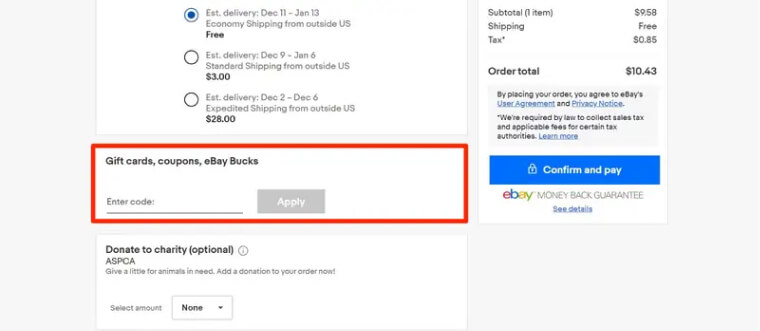
The checkout process is where many users encounter confusion when learning how to use eBay gift card codes effectively. Here’s a detailed breakdown of the payment section during checkout.
Desktop Checkout Process
When you reach the payment section during checkout:
- Locate the “Payment methods” section on the checkout page
- Find the “Gift cards” subsection below credit card options
- Click “Add a gift card” to reveal the input field
- Enter your 16-digit redemption code without spaces or dashes
- Click “Apply gift card” to validate the code
- Confirm the gift card balance appears as payment credit
- Proceed with checkout using gift card funds plus any additional payment if needed
Security Considerations During Checkout
- Use secure networks: Always redeem gift cards on trusted Wi-Fi connections
- Verify HTTPS: Ensure the URL shows “https://” for secure transactions
- Log out after use: Especially important on shared or public computers
- Save confirmation emails: Keep redemption confirmations for your records
Common Checkout Issues and Solutions
Issue: “Invalid code” error message Solution: Verify all characters are correct, including checking for zeros vs. letters “O”
Issue: Gift card balance not applying Solution: Refresh the page and try entering the code again
Issue: Partial balance problems Solution: Ensure your total purchase amount doesn’t exceed available gift card funds
Using eBay Gift Cards on Mobile vs. Desktop
The experience of using eBay gift cards can vary between mobile devices and desktop computers. Understanding these differences helps ensure smooth transactions regardless of your preferred shopping method.
Mobile App Experience
The eBay mobile app offers a streamlined gift card experience:
Advantages of Mobile Usage:
- Touch-friendly interface: Larger buttons and simplified navigation
- Auto-fill capabilities: Some devices can auto-populate gift card codes
- Instant notifications: Immediate alerts for successful redemptions
- Biometric security: Use fingerprint or face recognition for account access
Mobile Redemption Steps:
- Open the eBay app and log into your account
- Tap “My eBay” at the bottom navigation bar
- Select “Account settings” from the menu
- Tap “Gift cards & coupons” option
- Choose “Redeem a gift card” button
- Enter or scan your gift card code using the camera feature
- Confirm redemption and check updated balance
Desktop Experience
Desktop browsers provide a more detailed interface for gift card management:
Desktop Advantages:
- Detailed account management: Full access to gift card history and balances
- Multi-tab shopping: Compare prices while managing gift cards
- Keyboard shortcuts: Faster navigation for power users
- Better error handling: More detailed error messages and troubleshooting options
Key Desktop Features:
- Comprehensive gift card dashboard: View all active cards and balances
- Transaction history: Detailed records of gift card usage
- Advanced search filters: Find specific transactions or balances easily
- Bulk actions: Manage multiple gift cards simultaneously
Platform-Specific Tips
For Mobile Users:
- Keep your app updated for the latest gift card features
- Use the camera scanner for physical gift cards to avoid typing errors
- Enable notifications for balance alerts and promotional offers
For Desktop Users:
- Bookmark the gift card management page for quick access
- Use keyboard shortcuts (Ctrl+V) for pasting long redemption codes
- Take advantage of the larger screen for detailed balance tracking
Checking Your eBay Gift Card Balance
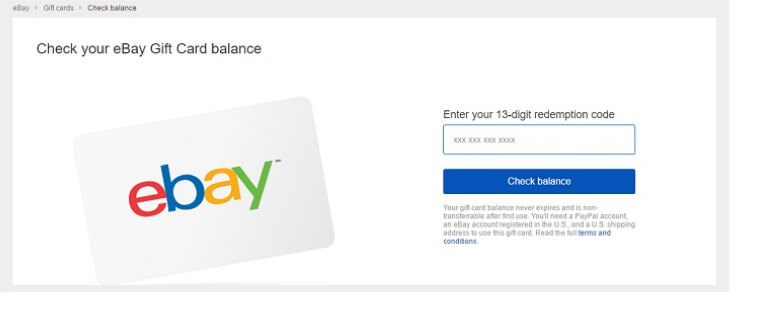
Monitoring your eBay gift card balance is essential for effective budget management and ensuring you have sufficient funds for purchases. eBay provides several convenient methods to track your available credit.
Online Balance Checking Methods
Method 1: Through Your eBay Account
- Sign in to your eBay account
- Go to “My eBay” > “Account”
- Click “Gift cards” in the sidebar
- View current balances for all added gift cards
- Check transaction history for detailed usage records
Method 2: eBay’s Official Balance Checker
- Visit eBay’s gift card balance page directly
- Enter your gift card number (16-digit code)
- Input security code if prompted
- Click “Check balance” for instant results
- Note the results for your records
Mobile Balance Checking
The eBay mobile app provides quick balance checking:
- Open eBay app and navigate to account settings
- Tap “Gift cards & coupons” section
- View all active card balances in one convenient location
- Set up balance alerts for low balance notifications
Best Practices for Balance Management
Regular Monitoring:
- Check balances before major shopping sessions
- Set calendar reminders for monthly balance reviews
- Track spending patterns to optimize future purchases
Security Measures:
- Never share balance information with unknown parties
- Report suspicious balance changes immediately
- Use secure networks when checking balances online
For more information, Please check our guide here:
Tips for Savvy Shopping with eBay Gift Cards
Maximizing the value of your eBay gift card requires strategic thinking and smart shopping techniques. These expert tips will help you stretch your gift card dollars further and get the most value from every purchase.
Strategic Timing for Maximum Savings
Seasonal Shopping Opportunities:
- Black Friday and Cyber Monday: Combine gift cards with site-wide discounts for double savings
- End-of-season clearances: Use gift cards on already reduced items for maximum value
- Holiday periods: Take advantage of promotional offers that stack with gift card payments
- Back-to-school seasons: Electronics and supplies often see significant price drops
Daily Deal Strategies:
- Monitor eBay’s “Daily Deals” section for limited-time offers
- Set up alerts for items on your wishlist to catch price drops
- Use gift cards during flash sales for compounded savings
- Check “Today’s Deals” before making any purchase
Category-Specific Shopping Tips
Electronics and Gadgets:
- Research model numbers before purchasing to ensure compatibility
- Compare prices across multiple sellers for the best deals
- Look for certified refurbished items for significant savings
- Consider buying accessories separately to maximize gift card value
Fashion and Apparel:
- Check size charts carefully to avoid return shipping costs
- Look for bundle deals that combine multiple items
- Consider seasonal purchases during off-peak times
- Read reviews for quality and sizing accuracy
Collectibles and Antiques:
- Research item authenticity and market values
- Use gift cards for higher-value items where payment security matters
- Consider auction-style listings for potential bargains
- Factor in shipping costs when calculating total value
Advanced Shopping Strategies
Wishlist Optimization:
- Create multiple wishlists for different price ranges
- Use gift card balance to target specific wishlist categories
- Set up saved searches with email alerts for price changes
- Prioritize purchases based on urgency and value
Seller Research:
- Focus on top-rated sellers for reliable transactions
- Read recent feedback to gauge current service quality
- Consider shipping times and costs in your calculations
- Look for sellers offering returns and guarantees
Taking Advantage of eBay Promotions and Discounts
Combining eBay gift cards with promotional offers creates opportunities for exceptional savings. Understanding how to stack discounts with gift card payments can significantly increase your purchasing power.
Types of eBay Promotions
Site-Wide Promotions:
- Percentage-off sales: Typically 10-20% off everything site-wide
- Category-specific discounts: Targeted savings on electronics, fashion, or home goods
- Free shipping events: Eliminate shipping costs on qualifying orders
- Cashback promotions: Earn money back on purchases made with gift cards
Seller-Specific Offers:
- Store promotions: Individual seller discounts and clearance sales
- Volume discounts: Savings for purchasing multiple items from same seller
- Loyalty rewards: Benefits for repeat customers of specific sellers
- Bundle deals: Package discounts for related items
eBay Plus Benefits
eBay Plus membership enhances gift card value through:
- Free shipping: Eliminate shipping costs on eligible items
- Exclusive deals: Member-only discounts that stack with gift cards
- Priority support: Faster customer service for any gift card issues
- Extended returns: Longer return windows for gift card purchases
Promotional Stacking Strategies
Timing Your Purchases:
- Wait for major sale events to maximize gift card impact
- Combine manufacturer rebates with eBay promotions
- Use gift cards during double cashback periods
- Plan large purchases around quarterly sales events
Coupon Code Combinations:
- Apply percentage-off coupons before using gift cards
- Stack manufacturer coupons with eBay promotions
- Use category-specific codes for targeted savings
- Check for first-time buyer discounts on new accounts
Creating Purchase Urgency
Take advantage of limited-time offers by:
- Setting up deal alerts for items on your wishlist
- Following eBay’s social media for flash sale announcements
- Subscribing to eBay’s promotional emails for advance notice
- Using mobile push notifications for instant deal alerts
Planning Purchases to Maximize Gift Card Use
Strategic purchase planning ensures you get maximum value from your eBay gift card while avoiding waste or suboptimal spending decisions.
Budget Planning Strategies
Gift Card Allocation:
- Essential purchases: Allocate 60% for needed items
- Wishlist items: Reserve 30% for desired but non-essential purchases
- Opportunity savings: Keep 10% available for unexpected deals
Seasonal Purchase Planning:
- Q1 (Jan-Mar): Electronics clearance and winter clothing sales
- Q2 (Apr-Jun): Spring cleaning supplies and outdoor equipment
- Q3 (Jul-Sep): Back-to-school supplies and summer clearance
- Q4 (Oct-Dec): Holiday shopping and year-end deals
Creating Effective Shopping Lists
Priority-Based Organization:
- High Priority: Items needed within 30 days
- Medium Priority: Items wanted within 90 days
- Low Priority: Items for future consideration
- Opportunity Items: Products to buy only if heavily discounted
Price Tracking Methods:
- Use eBay’s “Watch” feature to monitor price changes
- Set up third-party price alerts for specific items
- Create spreadsheets comparing prices across different sellers
- Note historical price patterns for seasonal items
Avoiding Common Pitfalls
Impulse Purchase Prevention:
- Implement a 24-hour waiting period for non-essential items
- Set spending limits for different product categories
- Use wishlists instead of immediate purchases for wants vs. needs
- Review purchase history monthly to identify spending patterns
Balance Management:
- Avoid letting small balances sit unused for extended periods
- Combine multiple small-balance cards when possible
- Use remaining balances for shipping costs or small accessories
- Plan final purchases to use complete card balances efficiently
Safe Practices for Using Your eBay Gift Card
Security should be your top priority when using eBay gift cards. Following best practices protects your gift card value and ensures safe, successful transactions.
Account Security Measures
Strong Authentication:
- Enable two-factor authentication on your eBay account
- Use unique, strong passwords that aren’t shared with other accounts
- Regular password updates: Change passwords every 90 days
- Secure email access: Protect the email account linked to your eBay profile
Account Monitoring:
- Review account activity weekly for unauthorized changes
- Check gift card balances regularly for unexpected reductions
- Monitor transaction history for unfamiliar purchases
- Set up account alerts for login attempts and balance changes
Gift Card Protection Strategies
Code Security:
- Never share gift card codes via email, text, or phone calls
- Store codes securely: Use password managers or encrypted files
- Photograph physical cards: Keep secure digital copies as backup
- Scratch off coating carefully: Avoid damaging the redemption code
Redemption Safety:
- Only redeem on official eBay sites: Verify URLs before entering codes
- Use secure networks: Avoid public Wi-Fi for gift card transactions
- Clear browser data: Remove saved codes from shared computers
- Verify redemption immediately: Confirm successful code activation
Scam Prevention
Common Gift Card Scams to Avoid:
- Fake customer service calls: eBay never calls requesting gift card codes
- Phishing emails: Verify sender authenticity before clicking links
- Too-good-to-be-true deals: Be suspicious of unrealistic discounts
- Advance payment requests: Never pay with gift cards for outside services
Legitimate Seller Verification
When using gift cards for purchases:
Seller Checklist:
- Top-rated seller status: Look for eBay’s top-rated badges
- Recent positive feedback: Check reviews from past 30 days
- Detailed item descriptions: Complete, accurate product information
- Professional communication: Proper grammar and timely responses
- Return policy clarity: Clear terms for returns and exchanges
Transaction Safety:
- Use eBay’s messaging system: Keep all communication on the platform
- Pay through eBay checkout: Never arrange external payment methods
- Save transaction records: Keep confirmation emails and receipts
- Report suspicious activity: Contact eBay immediately for any concerns
For secure, reliable eBay gift card purchases, ARPAY offers verified, legitimate gift cards with instant delivery and comprehensive customer support, ensuring your transactions are safe and protected.
Buy eBay Gift Cards from ARPAY
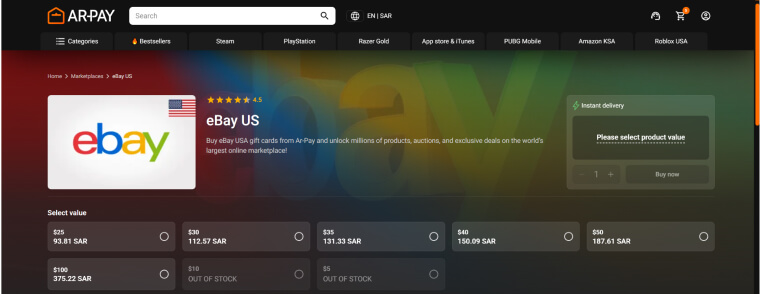
When you need reliable, secure eBay gift cards, ARPAY stands out as the premier destination for discerning shoppers who value quality, security, and exceptional service.
Why Choose ARPAY for eBay Gift Cards?
Instant Digital Delivery:
- Immediate email delivery: Receive your gift card codes within minutes of purchase
- 24/7 availability: Shop for gift cards anytime, any day of the week
- Multiple format options: Choose from various denominations to match your needs
- Bulk purchase options: Buy multiple cards for gifts or business use
Competitive Pricing and Value:
- Market-leading rates: Consistently competitive prices across all denominations
- No hidden fees: Transparent pricing with no surprise charges
- Regular promotions: Seasonal offers and loyalty rewards for repeat customers
Uncompromising Security:
- Verified authentic cards: Only legitimate, directly-sourced eBay gift cards
- Secure transaction processing: Industry-standard encryption for all purchases
- Fraud protection: Advanced monitoring systems prevent unauthorized access
- Safe payment methods: Multiple secure payment options including major credit cards
Read more: Apple Pay: 101 Guide to Mobile Payments and Digital Wallets
ARPAY’s Customer Service Excellence
Expert Support Team:
- 24/7 customer assistance: Round-the-clock support for any questions or concerns
- Multilingual support: Service available in multiple languages
- Technical expertise: Knowledgeable staff familiar with all gift card platforms
- Rapid response times: Most inquiries resolved within one hour
Customer Satisfaction Guarantees:
- 100% authenticity promise: Every gift card guaranteed to be legitimate and functional
- Money-back guarantee: Full refunds for any non-working gift cards
- Replacement policy: Immediate replacement for any technical issues
- Satisfaction tracking: Regular follow-up to ensure customer happiness
Getting Started with ARPAY
Simple Purchase Process:
- Visit ARPAY’s eBay gift card section and browse available options
- Select your preferred denomination and quantity needed
- Add to cart and proceed to secure checkout
- Complete payment using your preferred secure method
- Receive instant delivery via email with redemption instructions
- Enjoy shopping with your authentic eBay gift cards
Account Benefits:
- Purchase history tracking: Easy access to all previous orders
- Reorder functionality: Quick repeat purchases with saved preferences
- Exclusive member offers: Special pricing and early access to promotions
- Priority support: Enhanced customer service for registered users
Trust and Reliability Indicators:
- Established reputation: Years of successful gift card sales
- Customer testimonials: Thousands of satisfied customers worldwide
- Industry certifications: Verified security and authenticity standards
- Partnership credentials: Official relationships with major gift card providers
Conclusion
Mastering how to use eBay gift card effectively opens up a world of savings opportunities and shopping flexibility.
From understanding the basics of gift card types and redemption processes to implementing advanced strategies for maximizing value, you now have the comprehensive knowledge needed to make the most of every eBay gift card dollar.
Ready to experience the ARPAY difference? Shop eBay Gift Cards at ARPAY Now and discover why thousands of customers trust us for their digital gift card needs.

FAQs
How long does it take to redeem an eBay gift card?
Gift card redemption is typically instant once you enter a valid code. Digital codes are applied to your account immediately, while the balance becomes available for use right away. If you experience delays, try refreshing your browser or logging out and back into your account.
Can I use multiple eBay gift cards for a single purchase?
Yes, eBay allows you to combine multiple gift cards for a single transaction. You can add several gift card codes during checkout, and their values will be combined to cover your purchase. Any remaining balance after using multiple cards can be paid with other methods like credit cards or PayPal.
What should I do if my eBay gift card code isn’t working?
If your gift card code isn’t working, first verify you’ve entered all characters correctly, distinguishing between zeros and the letter “O.” Clear your browser cache, try a different browser, or attempt redemption from a different device. If problems persist, contact eBay customer service with your gift card details for assistance.
Do eBay gift cards expire?
Most eBay gift cards do not have expiration dates and retain their full value indefinitely. However, some promotional gift cards or cards purchased through third parties may have different terms. Check your specific gift card details or terms of purchase to confirm expiration policies.
Can I get a refund for an unused eBay gift card?
eBay’s standard policy does not allow refunds for unused gift cards, as they are considered non-refundable once purchased. However, if you purchased the gift card from ARPAY or another authorized retailer, check their specific refund policies, as some sellers offer satisfaction guarantees.

Hager Hesham
Content Writer and your go-to gaming expert. I'm here to share my best practices, valuable strategies, and professional gamer guidance. Also, I'm a gem hunter for the best deals and gift cards, just to enjoy games at almost zero cost with AR-pay.

