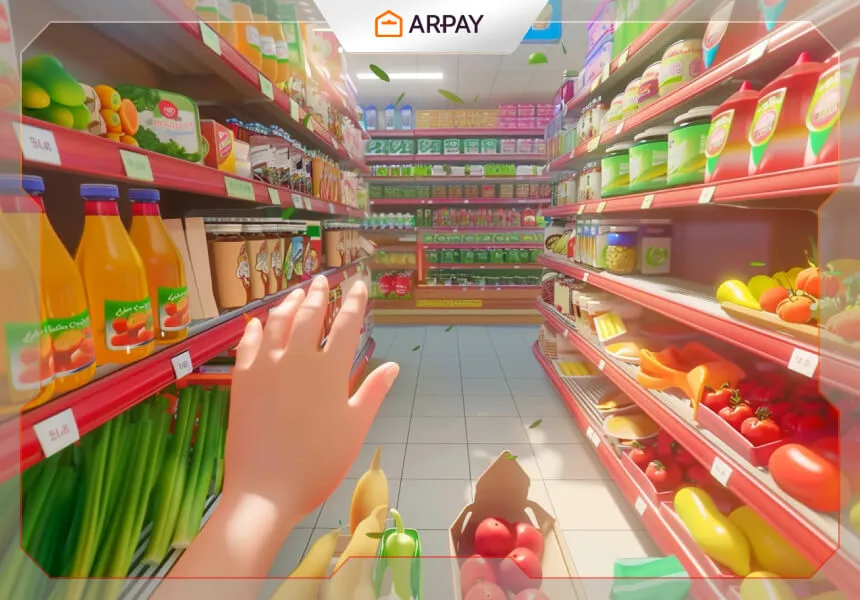
Supermarket Simulator is an immersive and engaging video game that drops you into the busy world of retail management.
In this simulation, you step into the supermarket manager role and handle the essentials: stocking shelves, tracking inventory, setting prices, dealing with customers, and trying to grow from a small store into something bigger.
The appeal is simple: it feels grounded. Even in 2026, the best runs come from the same fundamentals real stores rely on—good product mix, sensible pricing, efficient staff, and a layout that keeps customers moving.
As you progress, you typically unlock more upgrades and face tougher decisions (like when to expand, what to stock, and how to keep profits steady without annoying customers). The exact mechanics vary by game version and updates, so always check the Steam store page for current features.
Best way to start a supermarket in Supermarket Simulator
Starting your first store can be both fun and surprisingly educational. The early game is where most players either build a stable foundation—or accidentally burn cash on the wrong things.
Here’s a strategic approach that still holds up in 2026 if you want a smoother start and fewer “why am I broke?” moments.
Research and planning
Start by understanding the virtual market you’re in. Pay attention to what customers request, which products move fastest, and how competitors (or the game’s demand system) behave.
If location choices exist in your version, pick a spot that supports steady foot traffic, not just “looks nice.”
Then plan your layout with flow in mind: the more naturally customers browse, the more consistent your sales tend to be. Practical layout beats fancy layout early on.
Budgeting and finance
Allocate your starting funds wisely. A good early balance is “functional first, pretty later.”
Avoid overspending on decorations or stocking too wide too soon. It’s better to keep a smaller range of high-demand items fully stocked than a massive range that constantly runs out.
In 2026 terms: treat cash like oxygen. Keep a buffer for restocks, repairs, or staffing changes, especially if your version includes fluctuating demand or surprise expenses.
Inventory management
Pick a diverse product mix, but prioritize high-turnover staples. Watch what sells out first, and restock those items before you experiment with niche products.
Track inventory levels so you don’t overstock (tying up cash) or understock (losing sales). If your version supports analytics or reports, check them regularly—they usually reveal what’s quietly dragging profit down.
Pricing strategies
Set prices competitively but profitably. If your game shows competitor pricing or customer sensitivity, use that data rather than guessing.
Run small tests: adjust one category at a time and watch results. Discounts can increase traffic, but if you drop prices too hard you can end up selling more and earning less.
A simple approach: keep essentials priced fairly to maintain steady volume, then use promotions strategically on items that need movement.
Staff management
Hire staff with a purpose. If you’re getting long lines, you need checkout help. If shelves are empty, you need stocking support.
Good staff improves customer satisfaction and keeps operations smooth. If your version includes training or skill upgrades, invest when you can—but not at the expense of keeping the store stocked.
Marketing and promotions
If your version includes marketing tools (flyers, billboards, or in-game campaigns), use them to drive targeted traffic. Seasonal promotions and loyalty-style perks can also boost retention.
Just keep your promise: don’t market heavily if you can’t keep shelves stocked, because frustrated customers are the fastest way to tank reputation in most management sims.
Customer service
Focus on a smooth experience: short lines, stocked shelves, and fair pricing. Happy customers are more likely to return in most simulation systems.
If complaints appear in your version, treat them as signals. Fix the root cause—layout bottlenecks, staffing gaps, or pricing issues—rather than chasing symptoms.
Expansion and growth
When profits stabilize, reinvest thoughtfully. Expand product range, upgrade facilities, or open new sections only when you can support them with inventory and staffing.
Growing too fast is the classic trap: more space means more stock needs, more management complexity, and more ways to disappoint customers.
If you want one rule that works in 2026: expand only after you can keep your current store running smoothly for several in-game days without emergency fixes.
How to build your store with Steam gift cards
If you want to buy Supermarket Simulator (or add funds for in-game content) using Steam gift cards, here’s a simple approach you can follow in 2026.
Purchase Steam gift cards
First, obtain Steam gift cards. Choose an amount that fits your budget.
Then redeem the Steam wallet code:
• Log into Steam
• Go to the “Games” menu
• Select “Redeem a Steam Wallet Code”
• Enter the code
Your Steam wallet balance should update after redemption. Exact menu labels can differ slightly by platform and Steam UI updates.
Purchase the game
With your Steam wallet funded, search for Supermarket Simulator in the Steam Store.
Make sure you’re looking at the correct title (similar names exist in the simulator genre). Then add it to your cart, and at checkout choose Steam Wallet as the payment method.
Pricing can change with regional pricing updates, sales, and publisher decisions, so check the current price on Steam at the time you buy.
Download and install the game
After purchase, download and install the game from your Steam Library. Follow the on-screen prompts and make sure you have enough storage space before starting the install.
Conclusion
Supermarket Simulator offers a fun blend of strategy, management, and realism, giving players a hands-on way to learn the basics of running a store.
If you want to enjoy a smoother start, focus on the fundamentals: stock what sells, price with intention, staff for the bottlenecks you actually have, and expand only when your current setup is stable.
And if you’re buying it on Steam with gift cards, redeem your wallet code first, confirm the game title, and keep a buffer for sales tax or regional pricing changes where applicable.