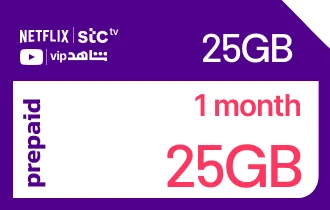
STC Quicknet 25GB + 25GB Streaming EVD for 1 Month
Get STC Quicknet KSA gift cards from Ar-Pay to recharge your balance and enjoy seamless connectivity with ease.
Saudi Arabia
25GB + 25GB Streaming EVD for 1 Month
1




Buy STC Quicknet 25GB + 25GB Streaming EVD for 1 Month Gift Card Now
Experience the freedom with your favorite STC Quicknet 25GB + 25GB Streaming EVD for 1 Month Gift Card. This rechargeable card can be used to recharge your package easily. With the STC Quicknet 25GB + 25GB Streaming EVD for 1 Month Gift Card, you can gift your loved ones the freedom to choose the communication services that suit them best.
Features:
- Rechargeable: Recharge the card with your preferred amount.
- Usable for any STC package: Use the card to purchase your STC package.
- Easy to use: Activate the card easily through the website or app.
- Valid for 365 days: Use the card within 365 days of purchase.
- Transferable: Gift the card to your loved ones as a valuable present.
How to redeem?
You can recharge STC Sawa through different methods:
- Dial *155* → enter your recharge voucher number → press # then Call
- Send an SMS message to 900 with: Recharge number (space) 155
- Call 1500, select recharge from the list, then insert the recharge card code
- Using MySTC application for smart devices
- Through Sawa website my.STC.com.sa/
- Using Sawa recharge page, then enter your mobile number and your code www.STC.com.sa/wps/wcm/connect/english/individual/mobile/prepaid/Charging-Sawa
How to recharge monthly Sawa packages and Sawa Plus packages:
Press *755* → followed by your recharge card number → then press # then call
How to charge Sawa from postpaid:
- Send a message to (900) containing (*144*).
- Enter the Sawa mobile number that you want to recharge.
- Add (*) then type the amount value and add (#).
How to check sawa balance:
To check the balance - dial *166#
STC Quicknet Gift Cards have a validity period of 12 months from the date of purchase. Once this period expires, the card cannot be used. To extend the validity, recharge the card with a minimum of SAR 50, which will add another 12 months to its validity.
To check the validity period, contact the STC customer service hotline or log in to your STC account online. If a card has already expired, contacting customer service may offer the possibility of a refund, although it is not guaranteed.
To avoid expiration, check the validity period before purchasing and recharge the card if not immediately used.
STC Quicknet Gift Cards are region-specific, meaning they can only be used in the country where they were purchased. The gift cards are denominated in the local currency of the country of purchase, such as Saudi Arabian riyals or United Arab Emirates dirhams. If you try to use STC Quicknet Gift Cards in a different country, it will not be accepted, and the gift card balance will not be added to your account. However, you can still use the gift card for international calls, but you will be charged the international calling rate. To avoid region restrictions, make sure to check the region of the gift card before purchasing and consider buying a local STC Quicknet Gift Cards if you are traveling to another country.
There are three ways to redeem STC Quicknet Gift Cards. Firstly, you can visit any STC store in Saudi Arabia and present the gift card to the cashier for scanning. The gift card amount will be added to your Sawa account balance. Secondly, you can use the STC Sawa app to redeem the gift card. Just enter the gift card code in the "Recharge" tab and click "Redeem". Lastly, you can call the STC customer service and provide the card code to redeem it. Please note that the card must be in good condition, have a balance of at least SAR 10, and only one card can be redeemed per transaction.
There are a few ways to check your STC Quicknet Gift Cards balance:
STC Sawa app: Open the app, go to the "Account" tab, and check the balance under the "Balance" section.
STC customer service hotline: Call 8001180008 and provide the customer service representative with the gift card code to know the balance.
SMS: Send SMS with *166* gift card code# to 900. The gift card code is the 16-digit code on the back of the card.
STC store: Visit STC store and present the gift card to the cashier for balance checking.
With STC Quicknet Gift Cards, you have the ultimate convenience in recharging your Sawa account or making purchases from STC. This versatile gift card is widely accepted at STC stores across the country, as well as through their online store and the Sawa app. You can easily use it to top up your mobile balance or enjoy a wide range of products and services.
The flexibility of the STC Quicknet Gift Cards extends further as it can be redeemed at self-service machines, adding a seamless and automated experience to your transactions.
Unlike physical cards, STC Quicknet Gift Cards are not something you can add to your wallet. Instead, they come in the form of codes that can be redeemed for airtime or other services. To add airtime to your STC Sawa account using a gift card, you have several options available.
One way to redeem your gift card is through the STC Sawa app. Simply open the app, navigate to the "Recharge" or "Top-up" section, and enter the gift card code when prompted. The corresponding amount will then be added to your Sawa account balance, ready to be used for calls, data, or other services.
To contact STC Quicknet Gift Cards customer support, you have a few options:
Call customer support hotline: Dial 902 (STC support number) and follow the prompts to connect with a representative who can assist you with any Sawa gift card inquiries.
Use the STC Self Service Portal: Visit the official STC website and navigate to the customer support section. From there, you can chat with online representative, send email, or submit a support ticket.
Visit STC branch or authorized agent: If you prefer face-to-face assistance, you can visit a nearby STC branch or authorized agent location.
No, STC Quicknet Gift Cards will not ask you to add additional payment details. STC Quicknet Gift Cards are prepaid cards that are used to purchase airtime or other services from STC. They are not credit or debit cards, so they do not require any additional payment details.
When you redeem STC Quicknet Gift Cards, you will simply need to provide the gift card code. The gift card code is a 16-digit code that is printed on the back of the gift card. Once you have provided the gift card code.
You can redeem your STC Quicknet Gift Cards at any STC store, STC Sawa app, or by calling customer service.
Here are ways to buy STC Quicknet Gift Cards with PayPal:
Online retailers: SEAGM, G2A, and Eneba sell STC Quicknet Gift Cards and accept PayPal as payment.
Physical retailers: Some STC stores and supermarkets also sell STC Quicknet Gift Cards and accept PayPal.
Third-party sellers: On marketplaces like eBay and Amazon, you can find sellers offering STC Quicknet Gift Cards and accepting PayPal.
Ensure the retailer or seller is reputable. Check reviews, ratings, and contact them for gift card policies. For physical purchases, ensure the card is sealed and unscratched with a valid expiry date. When using third-party sellers, confirm their credentials and reputation on the marketplace.
You can send STC Quicknet Gift Cards as a gift in a few simple ways:
Online Purchase: Buy the gift card online and have it emailed directly to the recipient. This is a convenient option as it allows you to choose from various online retailers that offer email delivery. The recipient will receive the gift card via email, along with a unique redemption code which they can use at any STC store or through the STC Sawa app.
In-store Purchase: Visit a physical STC store to purchase the gift card. After buying it, you can ask the cashier to gift-wrap it for a more presentable look.
No, you cannot use a STC Quicknet Gift Cards for family sharing purchases. Family sharing is a feature that allows you to share your Apple ID purchases with up to five family members. However, STC Quicknet Gift Cards are not Apple ID purchases. They are prepaid cards that are used to purchase airtime or other services from STC.
If you want to use your STC Quicknet Gift Cards to purchase something for a family member, you can simply give them the gift card code and they can redeem it themselves. You can also use the gift card to purchase something for yourself and then share the item with your family members.
With STC Quicknet Gift Cards, you can easily purchase airtime and other services from STC, Saudi Arabia's leading telecomm. provider. This versatile card allows you to conveniently top up your mobile phone, ensuring that you always stay connected. Additionally, you can use it to buy data bundles, enabling you to browse the internet, stream videos, and use various online applications.
Not only that, but the STC Quicknet Gift Cards also grants you the ability to make international calls, Send SMS messages to your friends and family, and share important updates and greetings with ease.
To use STC Quicknet Gift Cards, follow the steps:
Find a participating retailer or use it online through the STC Sawa website or app.
Check the balance of your card online or by calling the STC customer service hotline.
Redeem your gift card by providing the 16-digit code.
Make a purchase at any participating retailer, and the amount will be deducted from the card balance.
To redeem at STC store, present the card to the cashier and have the amount added to your Sawa account. Through the app, enter the gift card code in the "Recharge" tab. By calling customer service, provide the code for redemption.
When it comes to redeeming your STC Quicknet Gift Cards, you have multiple convenient options available. Firstly, you can visit any participating STC store in Saudi Arabia and redeem your gift card in person. The friendly staff will assist you in the process and ensure that the amount is successfully added to your account.
If you prefer the convenience of online redemption, you can vist STC Sawa website or the mobile app. For those who don't have STC Sawa account, you can directly redeem your gift card at a store. However, if you do have account, it's beneficial to redeem the card online.